It’s one of the most frustrating moments in email marketing. You pour hours into crafting the perfect campaign, hit send with high hopes, and then discover your messages are getting buried in the spam folder.
So, what gives? The problem isn’t just bad luck—it's usually a breakdown of trust between you and the major inbox providers like Gmail and Outlook.
These services are fighting a relentless battle against spam. Global email traffic is projected to hit a staggering 376.4 billion messages daily by 2025. What's wild is that nearly half of that—around 47% or 176 billion emails—is pure spam. That means every second, over 2 million unwanted emails are flooding the internet, forcing spam filters to be incredibly aggressive.
This is why your sending identity and practices are constantly under a microscope. Inbox providers use a complex web of signals to decide if you're a legitimate sender or just more noise. If your emails keep failing these checks, your deliverability is going to suffer.
The Three Pillars of Email Deliverability
When I'm troubleshooting why emails are going to spam, the root cause almost always traces back to one of three core areas. Think of it as a three-legged stool—if one leg is wobbly, the whole thing comes crashing down.
- Authentication: This is your digital passport. It's the technical side of things, like SPF, DKIM, and DMARC records, that prove you are who you claim to be and that your emails haven't been tampered with.
- Reputation: This is your "credit score" as a sender. It's built over time based on how people interact with your emails. Things like high spam complaint rates, bounced emails, or consistently low engagement will tank your reputation fast.
- Content and List Quality: This boils down to the value you provide and who you're sending it to. Blasting irrelevant content, using spammy-sounding language, or emailing a list full of unengaged subscribers sends all the wrong signals.
The flowchart below gives you a great visual of how a problem in any one of these areas can send your message on a one-way trip to the spam folder.
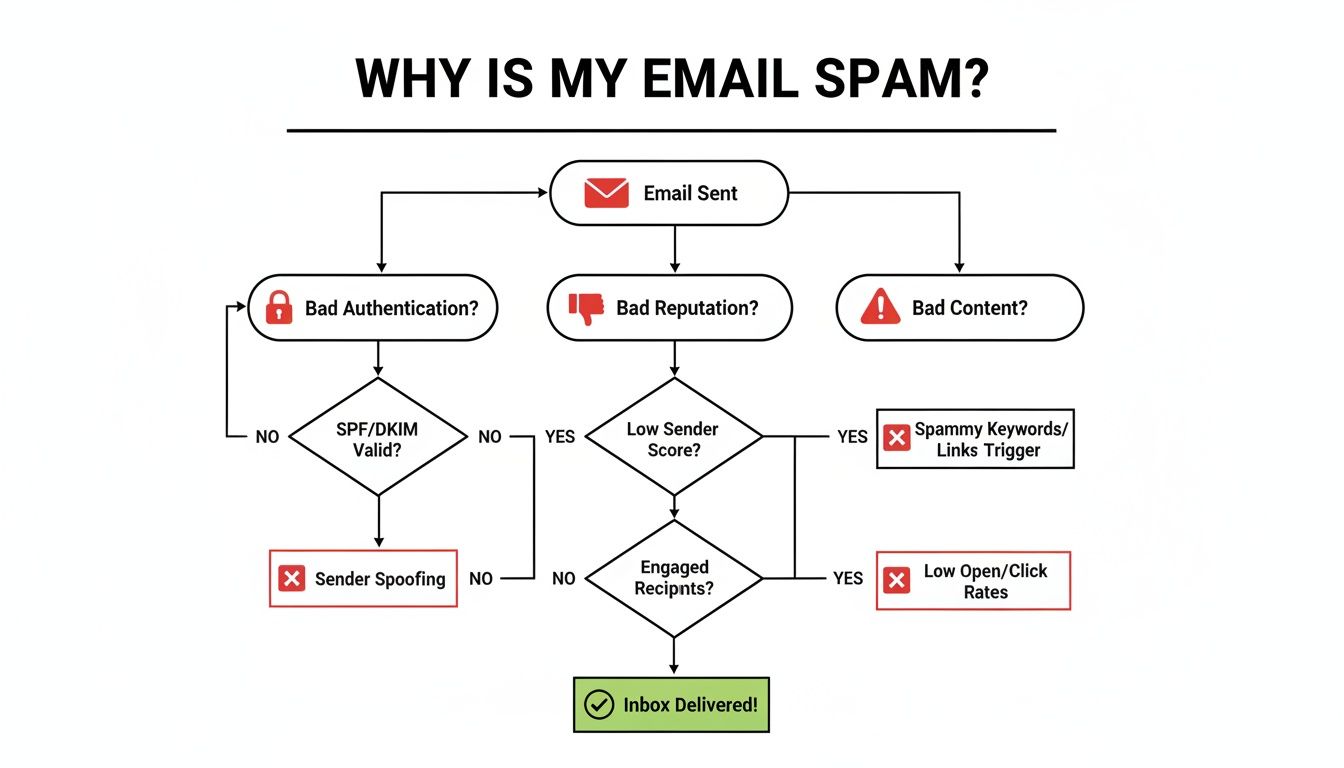
As you can see, a failure at any of these key checkpoints is a direct path to getting flagged.
Before diving deep into the fixes, let's start with a quick diagnostic.
Quick Diagnostic Checklist for Spam Issues
Use this table to quickly pinpoint why your emails might be landing in spam. Once you have a hunch, you can jump straight to the section with the solution.
| Common Problem | Why It Happens | Where to Find the Fix |
|---|---|---|
| Emails show a "via" or "on behalf of" notice. | Your SPF, DKIM, or DMARC records are missing or misconfigured, so providers can't verify your identity. | Section 1: Mastering Email Authentication |
| Open rates have suddenly dropped. | Your IP or domain reputation might be damaged due to spam complaints or hitting spam traps. | Section 3: Protecting Your Sender Reputation |
| You have high bounce or unsubscribe rates. | Your email list is outdated or contains unengaged subscribers who no longer want to hear from you. | Section 2: Building a High-Quality Email List |
| Your emails are flagged for suspicious content. | Your subject lines, images, or links are triggering spam filters. | Section 2: Crafting Content That Spam Filters Love |
| You just started sending from a new domain/IP. | New senders have no reputation, so inbox providers are naturally suspicious until you prove yourself. | Section 3: Protecting Your Sender Reputation |
| Deliverability is fine everywhere except Gmail. | Gmail has its own specific rules and thresholds for bulk senders that you might be violating. | Section 4: Testing and Monitoring |
This checklist should give you a solid starting point for your investigation.
Actionable Takeaway: Landing in the inbox isn't about some secret trick. It's about systematically building trust. You have to prove your identity, maintain a positive sending history, and deliver content that your audience actually wants to receive.
In the rest of this guide, we'll break down each of these pillars into clear, actionable steps. I'll walk you through how to diagnose the exact cause of your deliverability problems and give you a roadmap to fix them for good.
1. Mastering Email Authentication to Build Trust
Think of email authentication like a passport for your domain. Without it, inbox providers like Gmail and Outlook have no real way to verify that you are who you say you are. This instantly raises a massive red flag, often landing your emails in the spam folder before anyone even has a chance to see them.
Nailing your authentication is the technical bedrock of good deliverability. It all comes down to setting up a few key records in your domain's DNS settings. These records act as public, verifiable proof that your emails are the real deal and haven't been forged by a scammer.
What Are SPF, DKIM, and DMARC? (Explained Simply)
These three acronyms are the pillars of modern email authentication. They work together to wrap your sending domain in a powerful layer of trust, making it much harder for inbox providers to second-guess your legitimacy.
SPF (Sender Policy Framework): This is a public guest list for your domain. It’s a text record you publish that lists all the authorized servers and services—like your email marketing platform—allowed to send emails on your behalf. If a message shows up from a server not on that list, providers know it's suspicious.
DKIM (DomainKeys Identified Mail): Think of this as a tamper-proof digital seal on a letter. It adds a unique, encrypted signature to every email you send. When the email arrives, the recipient's server uses your public DKIM key to verify that the message hasn't been altered in transit.
DMARC (Domain-based Message Authentication, Reporting & Conformance): DMARC is the enforcer. It’s a policy that tells inbox providers what to do if an email fails either the SPF or DKIM check. You can instruct them to quarantine the message (send it to spam) or reject it outright, which is a powerful way to stop anyone from spoofing your domain.
Getting these set up correctly signals to the world that you’re a serious, responsible sender. It’s one of the most direct ways to solve the frustrating problem of your emails going to spam.
Real-World Example: An Authentication Meltdown
I once worked with a small e-commerce brand whose big product launch campaign was a complete disaster. Their open rates were in the single digits, and they quickly discovered nearly every email was landing in spam. A quick check with a free online tool revealed the culprit: they had no SPF record.
As far as Gmail and Outlook were concerned, their email service provider was an unauthorized sender. From the outside, it looked like a classic phishing attempt.
The Fix: We immediately created the correct SPF record and added it to their domain's DNS settings. Within 24 hours, their next campaign saw a massive jump in inbox placement, and open rates shot back to normal. It was a simple, 10-minute fix that salvaged their entire marketing push.
This is a perfect example of how a tiny technical oversight can have huge, costly consequences.
Step-by-Step: How to Check and Fix Your Records
You don't need to be a DNS wizard to check your authentication status. Follow these steps:
- Check Your Status: Go to a free online tool like MXToolbox or Dmarcian.
- Enter Your Domain: Type in your domain name (e.g., yourwebsite.com) and run the check for SPF, DKIM, and DMARC. The tool will give you a clear pass or fail report.
- Get the Correct Values: If a record is missing or wrong, log in to your email service provider (like Mailchimp, ConvertKit, etc.). They will have a dedicated section in their settings with the exact values you need to copy.
- Update Your DNS: Log in to your domain registrar (where you bought your domain, like GoDaddy, Namecheap, or Cloudflare). Navigate to the DNS management section and add or update the TXT records with the values you just copied.
This screenshot shows a simplified view of how an SPF record works in practice.
The record essentially communicates a set of rules for which servers are permitted to send mail, helping receiving servers validate the email's origin.
Once you have these records in place, you’ve built a strong technical foundation for your email program. For a deeper look into the mechanics, you can learn more about how to avoid spam filters in our detailed guide. It's the first and most critical step toward ensuring your messages are actually seen by your audience, not blocked by an automated security check.
2. Building a High-Quality Email List and Crafting Great Content
You can have the most technically perfect email setup in the world, but if you're sending to the wrong people, your messages will still land in spam. Your email list is your most valuable asset for deliverability. Constantly blasting emails to dead addresses or people who never open them is a massive red flag for providers like Gmail. It screams that your content isn't wanted.
Building and maintaining a quality list isn't about having the most subscribers. It's about having the right subscribers. This is a fundamental shift from quantity to quality, and it’s the secret to building a strong sender reputation that keeps you out of the junk folder.

Step 1: Confirm Subscriber Intent with Double Opt-In
The best way to start a healthy relationship with a new subscriber is with a double opt-in. It’s a simple concept: after someone signs up on your form, they get a confirmation email and have to click a link to be officially added to your list.
This little extra step is a powerhouse for list quality. First, it confirms the email address is valid and typo-free. More importantly, it verifies their intent—they genuinely want to hear from you. This process single-handedly weeds out bots, spam traps, and casual sign-ups that would otherwise poison your list from day one.
Step 2: Use Verification Services to Scrub Your List
Over time, all email lists decay. People switch jobs or abandon old email accounts. Sending emails to these invalid addresses causes hard bounces, which is a major ding against your sender reputation.
Before you launch a big campaign—especially if you're emailing a list that's been sitting for a while—run it through an email verification service. These tools check if an address is valid without actually sending an email, letting you safely remove the ones that would have bounced.
Here’s why this is non-negotiable for serious senders:
- It lowers your bounce rate: Slashing your hard bounces is one of the fastest ways to signal to inbox providers that you're a responsible sender.
- It protects you from spam traps: These are pristine email addresses used by blocklist providers to catch spammers. Hitting just one can get your entire domain blacklisted.
- It boosts your ROI: You stop paying your email platform to send messages into the void.
A little proactive cleaning pays for itself almost immediately. For a deeper dive, check out our guide on how to clean an email list effectively.
Step 3: Re-Engage or Remove Inactive Subscribers
Inbox providers are watching more than just bounces and spam complaints. They're tracking engagement. If a huge chunk of your list consistently ignores your emails, it tells them your content just isn't relevant.
You need a clear strategy for handling subscribers who have gone silent.
- Launch a Re-Engagement Campaign: First, try to win them back. Target subscribers who haven't opened an email in, say, 90 or 180 days. Send them a dedicated sequence with a great offer, ask for feedback, or just a simple, "Hey, do you still want to hear from us?"
- Prune the Unengaged: If they don't respond, it’s time to say goodbye. Regularly removing these subscribers from your active list is one of the healthiest things you can do for your deliverability.
Real-World Example: I once worked with a brand that was terrified of shrinking their list. Their open rates were in the gutter. We finally convinced them to remove everyone who hadn't opened a single email in six months. They "lost" 30% of their list overnight. The result? Their open rates on the very next campaign jumped by 15%, and their spam complaint rate fell to almost zero.
This proves it every time: a smaller, engaged list will always outperform a massive, silent one.
Step 4: Craft Content That Spam Filters Will Love
Even with a clean list, the content of your email itself can land you in spam. Modern spam filters analyze everything from your email's code to its copy to figure out if your message is valuable.
Actionable Tips for Better Content:
- Personalize Beyond the First Name: Use merge tags for their name, but also reference a recent purchase, their city, or an interest they've shared. This makes your email feel like a personal conversation.
- Ask Engaging Questions: Prompt a reply by asking for feedback. Replies are powerful positive signals to inbox providers.
- Maintain a Healthy Text-to-Image Ratio: An email made of one giant image is a huge red flag. A good rule of thumb is 80% text to 20% images. Always add descriptive ALT text to your images for accessibility and to give filters context.
- Use Clean and Responsive HTML: Stick to a reputable email service provider (ESP) with modern, tested templates. Messy code is a major deliverability killer. Before you send, run your email through a spam checker tool to catch potential issues.
| Spammy Email Element | Well-Crafted Alternative |
|---|---|
| Subject: FREE GIFT! You WON!!!!! | Subject: A Thank You Gift, Just for You |
| Body: One giant, unclickable image. | Body: Balanced text, images with ALT text. |
| CTA: Vague "Click Here" link. | CTA: "Get Your 15% Off Code" button. |
These small changes shift the message from a generic blast to a valuable communication. That's exactly what spam filters want to see.
3. Protecting Your Sender Reputation
Think of your sender reputation as a credit score for your email program. It's a critical, behind-the-scenes grade that inbox providers give your domain, and it's the single biggest factor in deciding if your emails hit the inbox or get dumped straight into spam.
This score is calculated based on how subscribers interact with your emails. Providers watch everything: bounce rates, spam complaints, unsubscribe rates, and positive signals like opens, clicks, and replies. If you keep sending campaigns people don't want, your reputation will tank.
Actionable Strategy: The Domain Warm-Up
If you’re sending from a brand-new domain or IP address, you don't have a reputation. Blasting thousands of emails on day one is the fastest way to get flagged as spammy. This is where "warming up" your domain is essential.
The goal is to build a positive sending history. You start small, sending to your most engaged contacts, and then gradually ramp up your volume over a few weeks. A huge part of this is regularly checking your domain's reputation to see how you're doing.
Here’s a sample warm-up schedule you can adapt:
| Week | Daily Sending Limit | Target Audience | Goal |
|---|---|---|---|
| 1 | 50-100 emails/day | Your most engaged subscribers (recent opens) | Achieve high open and click rates. |
| 2 | 250-500 emails/day | Expand to subscribers active in the last month. | Maintain high engagement as volume grows. |
| 3 | 1,000 emails/day | Include subscribers active in the last 3 months. | Establish a consistent sending pattern. |
| 4 | 2,500+ emails/day | Begin sending to your broader active list. | Scale volume while monitoring metrics closely. |
This gradual approach lets you build trust without setting off alarm bells, creating a solid foundation for all your future campaigns.
How to Recover a Damaged Reputation
So what happens if your reputation is already damaged? Don't panic. A damaged reputation isn't a life sentence, but fixing it takes patience and a strict return to the fundamentals.
Step-by-Step Recovery Plan:
- Stop All Bulk Sending: First, stop all large-scale sending immediately. You can't email your way out of a deliverability problem.
- Audit Your Program: Play detective and figure out what went wrong.
- List Hygiene: Get ruthless. Remove every unengaged subscriber and run your list through a verification service to scrub out invalid addresses.
- Content Review: Look at your recent campaigns. Were your subject lines misleading? Was the content irrelevant?
- Sending Frequency: Were you emailing too often? Sometimes you just need to back off.
- Start a "Re-Warming" Process: Once you’ve plugged the holes, begin a new warm-up process, starting with only your most loyal, hyper-engaged subscribers to rebuild positive signals.
Actionable Takeaway: Reputation recovery is a marathon, not a sprint. It can take weeks or even months of consistent, positive sending behavior to rebuild trust with inbox providers. There are no shortcuts.
Remember, you're competing in a noisy environment. The United States and China are the world's biggest sources of spam, each responsible for sending 7.8 to 8.61 billion spam emails every single day. With that much junk flying around, a pristine reputation isn't just nice to have—it's the only way to ensure your emails actually get seen.
4. Testing and Monitoring Your Email Deliverability
Fixing a deliverability problem is one thing. Preventing one from happening in the first place is the real goal.
This isn’t about firefighting; it’s about fire prevention. It means getting into the habit of proactive testing and monitoring. After all, you can't improve what you don't measure. These routines will help you spot trouble long before it torpedoes a major campaign.
Being proactive simply means keeping a close eye on your metrics to see how inbox providers and your subscribers are reacting to your emails. A small dip in engagement or a spike in bounces can be the canary in the coal mine, warning you of a bigger problem.
Essential Tools for Your Deliverability Toolkit
To get a real handle on your sender reputation, you need good data. Thankfully, there are several fantastic tools that can give you a clear picture of your email performance.
- Inbox Placement Testers: These are your eyes and ears inside the inbox. Services like these show you exactly where your email lands across major providers like Gmail, Outlook, and Yahoo. Instead of guessing, you can see if you’re hitting the primary inbox, the promotions tab, or the dreaded spam folder.
- Google Postmaster Tools: If you send any significant volume to Gmail, this is non-negotiable. Google Postmaster Tools gives you direct feedback from Google on your domain reputation, IP health, authentication status, and—most importantly—your spam complaint rates. It's an inside look you can't get anywhere else.
- ESP Bounce Reports: Your Email Service Provider's own analytics are a goldmine. Dig into your bounce reports and learn to distinguish between hard bounces (invalid addresses that need to be removed immediately) and soft bounces (temporary issues).
A sudden surge in soft bounces from a single provider, like Outlook, is a classic warning sign. It could mean they're starting to throttle your emails due to a reputation issue, giving you a chance to investigate and act before you get completely blocked.
Your Monthly Deliverability Checklist
Monitoring shouldn’t just be something you do when things go wrong. By turning it into a routine, you create a powerful feedback loop that keeps your deliverability strong month after month.
Actionable Monthly Review:
- Check Key Metrics: Look at your open, click, bounce, and unsubscribe rates. Are they stable or trending in the wrong direction?
- Review Spam Complaints: A complaint rate creeping above 0.02% is a serious red flag. Find out which campaigns caused spikes and figure out why.
- Check for Blocklistings: Use a free tool to make sure your domain or IP hasn’t landed on any major blocklists.
- Validate Authentication: Do a quick check to confirm that your SPF, DKIM, and DMARC records are still passing without any errors.
This simple routine empowers you to catch issues early and maintain high deliverability, ensuring your hard work actually pays off by reaching your audience.
Common Questions About Emails Going to Spam
Even when you have a solid deliverability strategy, some questions always come up. Here are answers to a few of the most common ones.
Can I Just Buy an Email List?
Let me be blunt: absolutely not. This is one of the fastest ways to completely destroy your sender reputation.
Purchased lists are a minefield of invalid addresses, uninterested contacts, and even hidden spam traps. Hitting just a few of these is enough to get your domain blocklisted and ensure every email you send goes straight to spam. Always, always build your list organically with explicit permission.
How Often Should I Clean My List?
Think of it like regular maintenance. For most senders, doing a deep clean every three to six months is a solid routine.
This involves more than just removing bounces. You should run your list through a verification service and then set up a re-engagement campaign for anyone who hasn't opened an email in the last 90-180 days. If they don't respond, it's time to remove them.
Will Using Emojis Get Me Flagged as Spam?
Not necessarily, but you have to be smart about it. A couple of relevant emojis in a subject line can actually catch the eye and boost your open rates.
The trouble starts when you go overboard or use emojis that have nothing to do with your message. That’s when you start looking unprofessional and spammy to filters. Moderation is key.
The battle against spam is a constant one. A staggering 97% of users report getting spam. This isn't just an annoyance; for many, it has real financial consequences, as you can see from the latest data on spam's impact.
Summary and Your Next Step
Landing in the inbox comes down to three key pillars: solid technical authentication (SPF, DKIM, DMARC), a high-quality, engaged email list, and a strong sender reputation. By systematically addressing each of these areas, you build trust with inbox providers and ensure your valuable content gets seen.
Recommended Next Step:
Start with a quick win. Use a free tool like MXToolbox to check your domain's SPF and DKIM records right now. Fixing any issues here is often the fastest way to see an immediate improvement in your deliverability.