When you're comparing Gmail vs Outlook for business, the decision really comes down to how your company works day-to-day. If you're an agile, cloud-first team, Gmail's AI-driven speed and collaborative DNA will feel like a natural fit. On the other hand, if your organization demands ironclad security and lives inside the traditional Microsoft Office suite, Outlook is the undisputed powerhouse.
Choosing Your Business Communication Hub

Picking a business email provider isn’t just about choosing an inbox. It’s about selecting the central nervous system for your company's communication and productivity. Your choice between Google Workspace (which powers Gmail) and Microsoft 365 (which powers Outlook) will ripple through everything from daily workflows to long-term growth.
This decision anchors your team in one of two very distinct digital ecosystems. Choosing Gmail pulls you into Google's universe of real-time, browser-based tools like Docs, Sheets, and Drive. Going with Outlook connects you firmly to the established Microsoft environment of Word, Excel, Teams, and SharePoint.
Gmail vs Outlook High-Level Decision Guide
To get your bearings quickly, think about which of these profiles sounds most like your business. This table is a simple gut check to help you align your priorities with the right platform from the get-go.
| Choose This Platform... | If Your Business Prioritizes... | Ideal For |
|---|---|---|
| Gmail | Speed, simplicity, and seamless cloud-based team collaboration. | Startups, remote-first teams, and creative agencies. |
| Outlook | Advanced security, granular control, and deep desktop software integration. | Enterprises, regulated industries (law, healthcare), and government agencies. |
This isn't to say a startup can't use Outlook or an enterprise can't use Gmail, but it's a solid starting point for understanding where each platform truly shines.
Market Dominance and Business Impact
The Gmail vs. Outlook debate is happening in a market that's absolutely booming. The U.S. business email sector is expected to grow from USD 12.2 billion in 2025 to USD 21.4 billion by 2035. What’s telling is that cloud solutions like Google Workspace and Microsoft 365 already make up 72% of current spending, proving they are the foundational tools for modern business.
While it’s smart to understand the full range of various business mail solutions out there, these two giants really do define the landscape. They aren't your only options, of course. For a broader look, you can check out our complete guide to the best business email providers to see how they compare to the competition. For now, though, we’ll focus on helping you make an informed decision between the two leaders.
Comparing Daily User Experience And Core Features
The choice between Gmail and Outlook runs deeper than just features; it shapes your team's entire daily rhythm. Each platform is built on a different philosophy of how work gets done, and that directly impacts how productive and comfortable your team will be.
Gmail is all about speed and simplicity. It was born on the web and operates on a search-first principle, encouraging you to find what you need in an instant rather than spending time filing every message. This is a perfect match for fast-paced teams where rapid communication is everything.
Outlook, on the other hand, is built for structure and control. It champions the traditional, folder-based system that many of us grew up with, allowing for deep customization and methodical organization. For any business that relies on precise record-keeping, Outlook’s powerful framework brings a welcome sense of order.
Organizing Your Inbox: A Tale of Two Systems
The most jarring difference you'll notice day-to-day is how each platform handles organization. Gmail uses a flexible labeling system, while Outlook sticks to a rigid folder structure.
- Gmail's Labels: Think of labels as tags. You can apply multiple labels to a single email, letting it live in several "categories" at once without creating duplicates. An invoice could be labeled "Invoices," "Q4-Finance," and the specific client's name.
- Outlook's Folders: This is the classic file cabinet approach. An email can only exist in one folder at a time, creating a clean, hierarchical tree. It's a system that feels immediately familiar, especially for anyone used to traditional desktop software.
Real-World Example: A marketing agency juggling multiple client campaigns would love Gmail's labels. An email about a social media ad can be tagged with the client's name, "Social Media," and "Pending Approval" simultaneously. In contrast, a law firm would feel right at home with Outlook's folders, creating a dedicated, self-contained folder for each case to keep all correspondence neatly siloed.
AI and Automation: The Productivity Boost
Both platforms embrace automation, but they focus their efforts differently. Gmail bakes AI directly into the writing process to save you seconds on every email.
Features like Smart Compose and Smart Reply predict what you want to type, offering up entire phrases and quick, one-click responses. These small assists might not seem like much, but they add up to a ton of saved time over a busy week. If you're ready to dive in, our guide on how to create a business email account with Gmail will get you up and running.
Outlook’s automation muscle comes from its powerful Rules engine. You can create incredibly complex, server-side rules that automatically sort, flag, or forward emails based on sender, subject, or keywords. This is a lifesaver for managing high-volume inboxes and making sure critical messages never get lost in the shuffle.
Search Functionality and Mobile Experience
When it's time to find that one specific email, Gmail’s Google heritage gives it an undeniable edge. The search is lightning-fast and scary accurate, digging through years of messages and attachments in a blink.
Outlook’s search is arguably more thorough, pulling in results from your calendar and contacts, but it can feel sluggish, especially if you have a massive mailbox stored offline.
On mobile, their core philosophies shine through once again.
- Gmail's Mobile App: It’s snappy, clean, and laser-focused on email. The experience is designed for getting in, finding what you need, and getting out.
- Outlook's Mobile App: This is more of an all-in-one command center. It integrates your calendar and contacts right into the main view, which is incredibly handy for anyone who lives by their schedule.
Ultimately, the better daily driver comes down to how your team works. The Gmail vs. Outlook decision really is a choice between flexible, search-driven speed and structured, rule-based control.
Evaluating The Collaboration And Productivity Ecosystems

When you choose Gmail or Outlook for your business, you're not just picking an inbox. You’re deciding on the entire digital workplace your team will live in every single day. This choice shapes how your people will share files, write documents together, and communicate in real time, making the surrounding ecosystem a massive factor in the Gmail vs Outlook for business debate.
Google Workspace, the suite that powers Gmail, was literally born in the cloud. Its greatest strength is how it enables frictionless, immediate collaboration that just feels intuitive. Everything is designed to work flawlessly in a browser, which knocks down barriers for teams spread out across different locations or devices.
Microsoft 365, on the other hand, comes from a legacy of powerful desktop software. While it has made incredible leaps into cloud collaboration, its ecosystem feels more structured and heavy-duty, with deep roots in apps like Word and Excel that have been the undisputed industry standard for decades.
The Cloud-Native Approach Of Google Workspace
The real magic of the Gmail ecosystem is how effortlessly it connects you to Google Docs, Sheets, and Slides. Sharing a document from Google Drive right inside a Gmail message is a fluid, one-click process that naturally fosters a collaborative mindset.
This integration really comes alive with real-time co-editing. Having multiple team members inside the same document at the same time, making changes, dropping comments, and literally seeing each other's cursors move—it creates a dynamic and transparent workflow that’s tough to beat.
Real-World Example: A remote marketing team can hop on a Google Meet call to brainstorm. During the call, they can all co-edit a campaign brief in Google Docs and fill out a content calendar in Google Sheets. Every change is visible to everyone, instantly. The whole process is fluid, immediate, and happens entirely in a web browser.
This setup is perfect for teams that live and breathe speed and agility. There’s no downloading files, no worrying about who has the latest version, and no emailing attachments back and forth. The single source of truth always lives in the cloud, ready for anyone with the right permissions.
Microsoft 365 And Its Enterprise-Grade Tools
Outlook’s role within Microsoft 365 offers a different, yet equally powerful, collaborative experience. Its strength lies in its deep ties to the desktop apps everyone knows and its integration with structured platforms like SharePoint and Teams.
While Microsoft Office apps also support real-time co-authoring, the ecosystem is built for a more formal structure. SharePoint serves as a heavy-duty backend for document management, offering sophisticated version control, permissions, and workflows that are non-negotiable for larger companies or regulated industries.
- Microsoft Teams Integration: Outlook is deeply woven into Teams, Microsoft's command center for all things communication. You can share an email directly into a Teams channel for discussion, instantly turning an inbox query into a collaborative project task.
- SharePoint for Document Control: For projects that demand strict oversight, files are managed through SharePoint. This provides a level of document security and process management that goes way beyond simple cloud storage.
- Familiar Desktop Power: Let's be honest, many power users still prefer the full feature set of desktop Word and Excel. Microsoft 365 nails the transition between powerful desktop editing and cloud-based teamwork.
Real-World Example: An enterprise engineering team is managing a complex product launch. All project documents are stored in SharePoint with strict versioning rules. Team members collaborate on technical specs using the desktop version of Word, while all communication and status updates are logged in a dedicated Microsoft Teams channel. This creates a highly structured, auditable, and secure environment.
Ultimately, the right choice boils down to your team’s collaborative DNA. If your business thrives on fast-paced, real-time brainstorming and cloud-first workflows, Google Workspace is a natural fit. But if you need a more structured, secure, and deeply integrated environment built around established desktop applications, the Microsoft 365 ecosystem is the clear winner.
Security, Compliance, and Getting Your Emails Delivered
Let's talk about the bedrock of any business email system: security. This isn't just a feature on a checklist; it's the foundation of trust between you and your clients. Both Google Workspace and Microsoft 365 offer serious, enterprise-level security, but they come at it from different angles. Their approaches directly impact everything from protecting your data to making sure your marketing emails actually land in the inbox.
Microsoft 365 often gets the nod in conversations where tight control and strict compliance are mission-critical. It’s built with a top-down, admin-first security model, giving IT teams powerful tools like Microsoft Defender for advanced threat protection.
Google Workspace, on the other hand, plays to its strengths: massive data processing and smart machine learning. Its security often feels more automatic and less hands-on for the user. It’s incredibly good at spotting and zapping threats like spam and phishing with uncanny accuracy—often before you even know they exist.
Comparing Threat Protection and Spam Filtering
While both platforms are pros at blocking the usual suspects, their philosophies are distinct. Microsoft hands a deep, granular toolkit to administrators who want to build and fine-tune specific security policies. This is perfect for organizations with dedicated IT staff who live and breathe this stuff.
Google’s power lies in its AI-driven, real-time threat analysis. Every day, Gmail processes billions of signals to identify brand-new malware patterns and phishing scams. A huge part of email security is knowing how to protect against phishing attacks, and Google's automated defense is one of the best in the business.
Actionable Takeaway: Microsoft 365 offers more direct, manual control for IT admins who need to enforce precise security rules. Gmail delivers a more automated, AI-powered defense that's exceptionally effective right out of the box with minimal tweaking.
Compliance for Regulated Industries
For businesses in fields like healthcare, finance, or law, sticking to regulations like HIPAA or GDPR isn't optional. Both platforms are certified for major compliance standards, but their ecosystems feel tailored to different kinds of organizations.
- Microsoft 365: It's long been the go-to for large enterprises. Microsoft provides exhaustive documentation and specific tools like Information Rights Management (IRM), which lets you control who can forward, copy, or print sensitive documents.
- Google Workspace: Google is also fully compliant with major regulations and includes powerful tools like Google Vault. Vault handles eDiscovery and data retention, which is a must-have for legal and financial compliance.
Ultimately, the choice often hinges on what your organization is already used to and what your auditors require. Companies with a long history of traditional IT infrastructure tend to find Microsoft’s compliance framework fits more naturally into their existing workflows.
How Your Choice Impacts Email Deliverability
Beyond just protecting your inbox, your email provider plays a huge role in your ability to reach other people's inboxes. This is where email deliverability becomes a make-or-break factor, especially for your marketing and sales teams. Simply using a professional domain with either Google Workspace or Microsoft 365 is the first critical step toward building a solid sender reputation.
Both services make setting up the essential email authentication protocols a straightforward process. You'll want to configure:
- SPF (Sender Policy Framework): This record proves which mail servers have permission to send emails from your domain.
- DKIM (DomainKeys Identified Mail): This adds a digital signature to your emails, confirming they weren’t tampered with along the way.
- DMARC (Domain-based Message Authentication, Reporting & Conformance): This tells receiving mail servers how to handle emails that fail the SPF or DKIM checks.
Getting these three records set up correctly is one of the most fundamental email deliverability best practices you can implement. Both Google and Microsoft provide clear, step-by-step guides to ensure your legitimate business communications—from marketing campaigns to client updates—don't get unfairly tossed into the spam folder.
Breaking Down Pricing Plans And Overall Value
Figuring out the true cost of Google Workspace versus Microsoft 365 isn't just about comparing the monthly sticker price. To make a smart call, you have to look at the whole picture—what you get for your money and how each plan will grow (or hold you back) as your business scales. The best plan isn't always the cheapest; it's the one that gives you the most bang for your buck based on how you actually work.
At first glance, the entry-level plans from both companies look pretty similar. For about the same monthly fee per user, you get a professional email, the essential apps, and a decent chunk of cloud storage. But the cracks start to show once your team expands and your needs get more complicated.
This is where you need to think about the total cost of ownership. That means looking beyond the subscription fee to consider hidden costs, like paying for extra storage or needing third-party tools that one suite might already include. A plan that looks like a great deal today could end up costing you more down the road.
Comparing Core Business Plans
Let's put the most popular entry-level and mid-tier plans under the microscope. For a freelancer or a tiny startup, the starter tiers are more than enough. But for a team that's starting to grow, the "Standard" plans are usually the sweet spot, unlocking better collaboration tools and a whole lot more storage.
Google Workspace vs Microsoft 365 Feature And Price Comparison
Here's a side-by-side look at the most popular business plans to help you see where the real value lies for your team.
| Feature | Google Workspace Business Starter | Microsoft 365 Business Basic | Google Workspace Business Standard | Microsoft 365 Business Standard |
|---|---|---|---|---|
| Price (per user/month) | ~$6 | ~$6 | ~$12 | ~$12.50 |
| Custom Business Email | Yes | Yes | Yes | Yes |
| Cloud Storage | 30 GB pooled per user | 1 TB per user (OneDrive) | 2 TB pooled per user | 1 TB per user (OneDrive) |
| Core Web/Mobile Apps | Docs, Sheets, Slides, Meet | Word, Excel, PowerPoint, Teams | Docs, Sheets, Slides, Meet | Word, Excel, PowerPoint, Teams |
| Desktop Office Apps | No | No | No | Yes (Word, Excel, etc.) |
| Meeting Participants | Up to 100 | Up to 300 | Up to 150 (with recording) | Up to 300 (with recording) |
As you can see, the biggest difference right away is storage. Microsoft 365 Business Basic hands you a massive 1 TB of OneDrive storage from day one, which makes Google's 30 GB starter plan look tiny in comparison. On the other hand, Google's pooled storage on its higher-tier plans offers a lot more flexibility for teams where some people need tons of space and others barely use any.
Value Beyond The Price Tag
The market dominance of each platform also plays a role in its overall value. Gmail clearly has the upper hand in global consumer use, while Outlook is deeply entrenched in the corporate world. Recent data shows Gmail's global email client market share hovering around 26–31%, with an estimated 1.8 billion accounts worldwide. While Outlook's client share appears smaller, Microsoft boasts around 400 million paid Microsoft 365 seats, and roughly 60% of Fortune 500 companies run on it. This means you'll find a larger pool of talent already familiar with one system over the other. You can find more details on Gmail’s massive scale and market statistics in this breakdown.
For a startup, the real value might be in Google Workspace's dead-simple setup and smooth cloud collaboration, which keeps IT headaches to a minimum. For a more established company, the value in Microsoft 365 could be its heavy-duty security features and the inclusion of full desktop Office apps, which means you don't have to buy separate software licenses.
At the end of the day, which one offers better value comes down to how your team operates. If your people live in desktop apps like Word and Excel and need huge amounts of individual storage, Microsoft 365 is tough to beat. But if your team is all-in on the cloud and values fast, agile collaboration, Google Workspace's slick, integrated ecosystem is incredibly compelling.
Making Your Final Decision
Choosing between Gmail and Outlook for your business boils down to one simple question: How does your team actually work?
We’ve picked apart features, security, and ecosystems. But the right choice isn’t about finding the “best” email service in a vacuum. It’s about picking the platform that feels like a natural extension of your team’s daily grind. Get it right, and you accelerate everything; get it wrong, and you introduce a thousand tiny points of friction.
A Clear Recommendation for Agile and Cloud-First Teams
We recommend Google Workspace (Gmail) for:
- Startups and Small Businesses: Its browser-first interface is dead simple. You can get a professional email running in minutes without a dedicated IT person on payroll.
- Creative and Marketing Agencies: The real-time collaboration in Docs, Sheets, and Slides is just unmatched for brainstorming copy, tweaking campaign assets on the fly, and keeping everyone in sync.
- Remote-First Companies: When your team is spread out, a frictionless, browser-based hub is non-negotiable. Workspace was practically built for this, ensuring everyone has the same tools and info, no matter their location or device.
For these kinds of businesses, Google Workspace's obsession with speed, powerful search, and seamless collaboration translates directly into faster project turnarounds. It’s the perfect engine for teams that need to move fast and stay aligned without getting bogged down by clunky software.
A Clear Recommendation for Structured and Enterprise Environments
We recommend Microsoft 365 (Outlook) for:
- Established Enterprises: If your organization is already swimming in the Windows ecosystem, Outlook’s deep hooks into desktop Office apps and Active Directory are a massive advantage.
- Regulated Industries (Legal, Healthcare, Finance): Microsoft 365 simply offers more granular admin controls and advanced compliance tools like Information Rights Management (IRM). For meeting strict regulatory standards, this is often a deal-breaker.
- Companies with Complex Workflows: The power to create complex, server-side rules in Outlook and integrate with platforms like SharePoint delivers a level of automation and document control that highly structured businesses depend on.
For these organizations, the secure, controlled, and deeply integrated world of Microsoft 365 provides the stability and governance needed for large-scale operations. It’s the go-to choice for businesses where process, security, and compliance are paramount.
Still on the fence? This decision tree can help crystallize your choice by walking you through the most important questions.
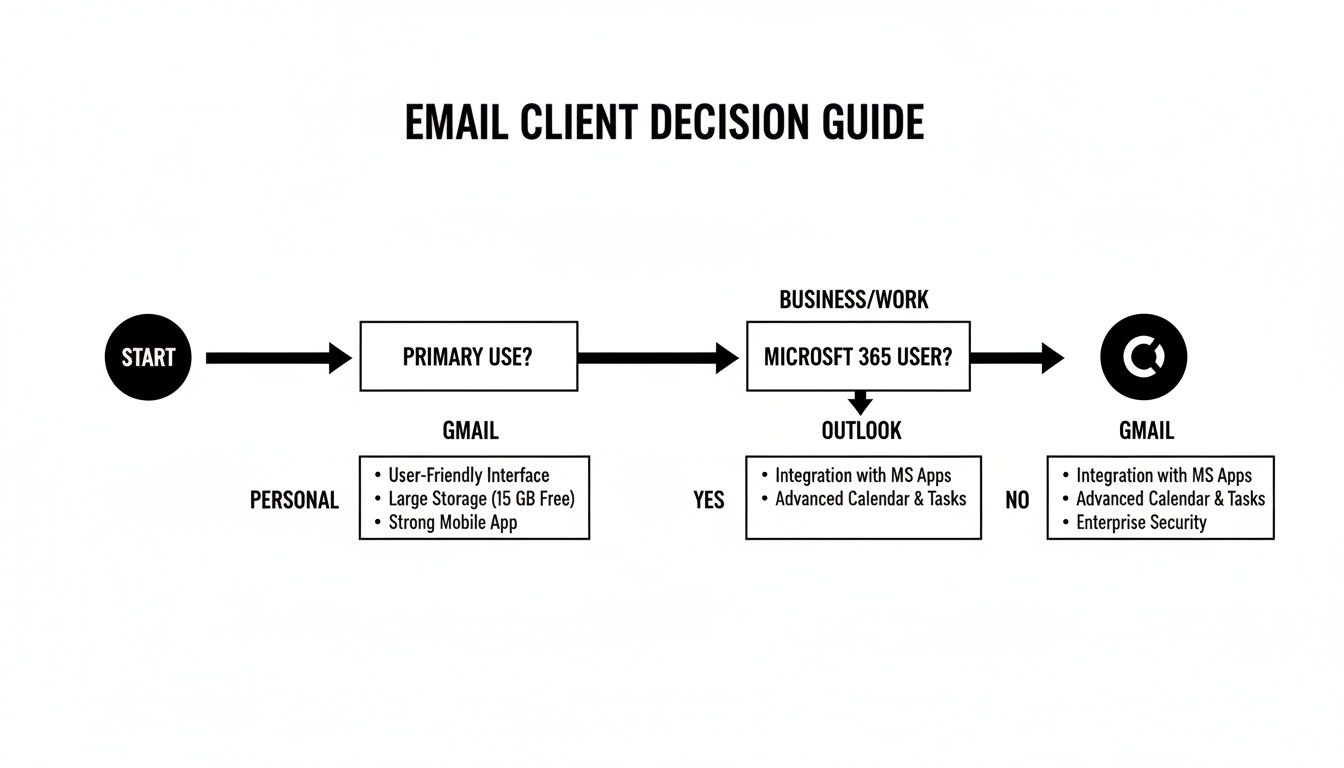
As the flowchart shows, this decision often comes down to your team's natural collaboration style and your existing software investments.
Summary and Next Steps
The best way to settle the Gmail vs Outlook for business debate is to map your team’s most frequent tasks to each platform's core strengths. Don't choose based on features alone; choose based on the workflow that will make your team most effective.
Your Recommended Next Step: Sign up for a free trial of the platform that seems like the better fit for your team's workflow. There is no substitute for getting your hands dirty. Using it in a real-world setting for a week is the fastest way to know for sure if you've found the right home for your team's communication.
Got Questions? We’ve Got Answers.
When you’re down to the wire on a big decision like Gmail vs. Outlook, a few last-minute questions always pop up. Let’s tackle the most common ones with some straight-to-the-point advice.
Which Is Better for Email Marketing Deliverability?
Honestly, neither one is automatically “better.” Both Google Workspace and Microsoft 365 give you the exact tools you need for rock-solid email deliverability. The real magic happens when you correctly set up your domain’s authentication records: SPF, DKIM, and DMARC. Both platforms fully support these.
The single most important step you can take is using a professional domain with either service. That’s how you build a positive sender reputation and show inbox providers your marketing emails are legit, which is your best defense against the spam folder.
Can I Switch from Gmail to Outlook Later?
You can, but it's a project. Migrating between platforms is a well-trodden path, and both Google and Microsoft have tools to help move your emails, contacts, and calendars over.
Don't underestimate the complexity, though. For bigger teams with years of archived data, it’s a detailed technical process to make sure nothing gets lost in translation. You’ll absolutely need to plan for a bit of downtime and get your team comfortable with the new system to pull it off smoothly.
Key Insight: While you can switch, it's a major headache. You’re far better off investing the time now to pick the platform that fits your long-term goals. It'll save you a ton of disruption down the road.
Do I Need the Desktop Outlook App to Use Microsoft 365?
Nope, not at all. While the desktop Outlook app is a powerhouse with the most features and customization options, Microsoft 365 also includes a fantastic web version of Outlook.
The web app has a modern, clean feel and is more than capable for handling your day-to-day email, calendar, and contact needs. It’s a great choice for teams who live in their browsers or use non-Windows machines.
Which Platform Offers Better Security Out of the Box?
For instant, AI-powered security that just works with zero tinkering, Gmail has a slight edge. Its machine learning is incredibly sharp at spotting and blocking spam and phishing attacks right away, no admin required.
Outlook and Microsoft 365, on the other hand, offer a fortress of powerful, fine-grained security controls. To really unlock its potential, though, an admin needs to get in there and configure specific policies and tools like Microsoft Defender. For businesses with an IT team, Outlook’s security can be customized to a much deeper, more granular level.
Ready to supercharge your email marketing, no matter which platform you choose? EmailGum provides the expert strategies and actionable guides you need to grow your audience and drive results. Join our free community today and start building campaigns that convert.