Landing your emails in the inbox starts with a strong foundation of trust. This isn't about clever subject lines or beautiful designs—not yet, anyway. It's about proving to inbox providers like Gmail and Outlook that you are who you say you are.
This all comes down to email authentication, which uses technical standards like SPF, DKIM, and DMARC to act as a digital passport for your messages. Getting this right is the absolute, non-negotiable first step. Without it, you’re basically sending mail in an unmarked envelope, making it easy for spam filters to reject you.
The Unskippable Trio: SPF, DKIM, and DMARC
Think of authentication as a three-legged stool. If one leg is wobbly, the whole thing comes crashing down. Each protocol plays a specific role in building a verifiable identity for your sending domain, and they work best when used together. Here’s a step-by-step look at what they are and why they matter.
Step 1: Set Up SPF (Sender Policy Framework): This is your approved senders list. An SPF record is a simple text file you publish in your DNS (Domain Name System) that lists all the servers authorized to send email on your behalf. It’s like telling the world, "If you get an email from my domain, it should only come from one of these IP addresses. Ignore all others."
Step 2: Implement DKIM (DomainKeys Identified Mail): This is the tamper-proof seal on your envelope. DKIM adds a unique digital signature to every email you send. The receiving server uses a public key (also in your DNS) to verify that signature, confirming the message hasn't been altered in transit.
Step 3: Enforce with DMARC (Domain-based Message Authentication, Reporting & Conformance): DMARC is the bouncer at the club. It tells inbox providers what to do if an email fails the SPF or DKIM checks. Should they quarantine it, reject it outright, or let it through? It also sends you reports on who’s trying to send mail from your domain, which is invaluable for spotting email spoofing attempts.
Setting these up correctly creates a powerful defense against spammers trying to hijack your brand's reputation.
Email Authentication At a Glance
| Protocol | What It Does (The Simple Version) | Why It Matters for Deliverability |
|---|---|---|
| SPF | Lists authorized sending servers for your domain. | Prevents others from sending mail using your domain name. |
| DKIM | Adds a digital signature to verify email integrity. | Proves the message wasn't forged or altered in transit. |
| DMARC | Sets rules for handling failed checks and provides reports. | Enforces your authentication policy and protects your brand reputation. |
This trio is your first line of defense, signaling to receiving servers that you're a legitimate, trustworthy sender.
Why You Absolutely Cannot Skip This in 2024
Not long ago, proper authentication was just a "best practice." Today, it's table stakes. The game has changed, especially with the rise of sophisticated AI filtering.
Think about this: Gmail's AI-powered systems now block over 99.9% of spam, catching around 100 million spam emails every single day. Emails without proper authentication are a massive red flag for these systems. If you don't have SPF, DKIM, and DMARC in place, you’re making it incredibly easy for them to lump your legitimate campaigns in with the junk.
Real-World Example: A small e-commerce brand, "Artisan Threads," was gearing up for its biggest sale of the year. They poured weeks into the campaign, but when they hit send, the results were a disaster. Open rates were in the single digits. After a frantic investigation, they found the problem: they’d forgotten to add their new email service provider to their SPF record.
To Gmail and Outlook, it looked like a massive, unauthorized spam attack coming from their domain. Nearly 80% of their emails went straight to spam, their domain reputation took a nosedive, and it took them months to recover.
This isn't just a technical task for the IT department. A simple DNS misconfiguration can make your entire marketing effort invisible. Getting your authentication right is the single most important action you can take to ensure your emails get delivered.
Master Your Sender Reputation for Long-Term Success
If email authentication is your passport to the inbox, then your sender reputation is your digital credit score. Internet Service Providers (ISPs) like Gmail and Outlook are always watching. They score your domain and sending IP address based on your actions, deciding whether you're a trustworthy sender or someone who belongs in the spam folder.
Think of it this way: preventing a bad reputation is far easier than trying to repair a damaged one. Every single email you send, every bounce you get, and every spam complaint filed goes into this score. It’s a living, breathing metric that tells the story of your entire email program's health.
Shared vs. Dedicated IP: A Key Strategic Choice
As your email list grows, you’ll face a common choice: stick with a shared IP address or invest in a dedicated one? Most email service providers (ESPs) start you on a shared IP, which means your sender reputation is influenced by hundreds, sometimes thousands, of other senders.
Real-World Example: Imagine a creator with a growing newsletter. At first, a shared IP is a great fit. It’s affordable, and she benefits from the positive reputation already built by other good senders on that IP. But then one day, another sender on the same IP runs a sloppy campaign and gets hit with a ton of spam complaints. Suddenly, her deliverability tanks, even though she didn't do anything wrong. The bad behavior of a complete stranger is dragging her down.
That's the biggest risk of a shared IP. A dedicated IP gives you total control over your reputation, but it also means you’re solely responsible for building and maintaining it from scratch.
Actionable Takeaway: For senders with high, consistent volume (over 100,000 emails per month) and a solid commitment to best practices, a dedicated IP is a game-changer. For smaller senders or those with sporadic volume, the stability of a well-managed shared IP is usually the smarter, safer bet.
Key Metrics That Define Your Reputation
ISPs aren't guessing when they score you; they're looking at cold, hard data. If you're serious about figuring out how to avoid mail going to spam, then you must monitor these metrics. They act as your early warning system, flagging problems before they get out of hand.
Here are the numbers that truly matter:
- Spam Complaint Rate: This one hurts the most. A rate above 0.1% (that's just 1 complaint for every 1,000 emails) is a massive red flag for ISPs.
- Hard Bounce Rate: These are permanent delivery failures, usually from invalid email addresses. If your rate is consistently above 2%, it’s a clear sign of poor list hygiene.
- Sending Volume Consistency: Huge, sudden spikes in your sending volume look incredibly suspicious. You need to "warm up" new IPs and domains gradually by slowly increasing volume to build trust.
- Engagement Metrics: Low open and click rates are a signal to ISPs that your subscribers don't want your emails. Conversely, high engagement is one of the strongest positive signals you can send.
The inbox is a crowded place. The United States and China generate the highest volume of spam, each pushing out roughly 7.8 billion emails every day. As a result, ISPs in these regions are especially aggressive with their filtering. This just goes to show that for legitimate marketers, reputation is built on consistent, relevant communication—not sheer volume. You can dive deeper into the numbers with more spam statistics on EmailToolTester.com.
Ultimately, your sender reputation is the sum of all your actions. By choosing the right infrastructure and keeping a close eye on the metrics ISPs care about, you build a foundation of trust that keeps your emails where they belong: the inbox.
Cultivate a Healthy and Engaged Subscriber List
Your email list is your single most valuable marketing asset, but its true power isn't measured in size—it’s measured in health and engagement. A small list of 1,000 true fans who eagerly open every email is far more valuable than a massive, dormant list of 100,000 people who ignore them.
ISPs pay very close attention to this. When subscribers consistently ignore your messages, it sends a powerful negative signal to inbox providers like Gmail. They see it as proof your content isn't wanted, making it far more likely your future campaigns will get routed straight to spam. Building a community that genuinely wants to hear from you is the ultimate defense against the spam folder.
Embrace Quality Over Quantity with Double Opt-In
The foundation of a healthy list is one word: permission. Never buy or rent an email list. It’s a fast track to the spam folder and a violation of the trust that makes email marketing work. Every person on your list must have explicitly opted in.
The best way to guarantee this is with a double opt-in process. Here’s how it works:
- A user signs up on your website.
- They immediately receive an automated email asking them to confirm their subscription by clicking a link.
- Only after they click that link are they added to your mailing list.
This simple step verifies the email address is valid (reducing bounces) and gives you undeniable proof that the subscriber wants to hear from you—a powerful positive signal for ISPs.
Practice Proactive List Hygiene
Email lists naturally decay as people change jobs or abandon old accounts. This is where proactive list hygiene becomes non-negotiable for anyone trying to figure out how to avoid mail going to spam. Regularly cleaning your list isn’t about losing subscribers; it’s about protecting your sender reputation.
Start by monitoring your engagement metrics. If a group of subscribers hasn't opened an email in the last 90 days, don't just keep sending them messages. It's time to launch a re-engagement (or "win-back") campaign.
Real-World Example: An online coffee retailer's open rates had dipped to a painful 15%. We identified subscribers who hadn't engaged in three months and sent them a final, friendly email titled "Is this goodbye?" It offered a special discount or an easy one-click option to unsubscribe. Many re-engaged, and the rest were gracefully removed. The result? Their average open rate jumped to over 30% within a month, and their inbox placement improved dramatically.
This process, often called "sunsetting," shows ISPs that you respect subscriber engagement and are committed to sending wanted mail. To get into the nitty-gritty of keeping your list pristine, check out this detailed guide on how to clean an email list.
Manage Your List for Better Deliverability
A healthy list also means dealing with the inevitable issues that pop up, like addresses being marked as "cleaned" by your email service provider. This can happen for lots of reasons, including hard bounces or repeated soft bounces.
To keep your list robust and dodge deliverability problems, understanding the process of fixing cleaned email lists is a crucial piece of a healthy email strategy.
By focusing on building a high-quality list and actively managing its health, you create a powerful feedback loop. High engagement tells ISPs your content is valuable, which boosts your deliverability and keeps your emails right where they belong—in the inbox.
Craft Content That Spam Filters—and Humans—Want to Read
Let’s get one thing straight: the old advice about just avoiding words like “free” or “sale” is completely outdated. Modern spam filters are far more sophisticated than simple keyword checkers. They’re now deeply focused on one thing above all else: how your audience interacts with your emails.
This means creating emails that land in the inbox is about demonstrating real value and building trust. It’s about writing subject lines that spark curiosity without screaming desperation, finding the right balance between text and images, and making sure every link you include is clean and reputable.
The Art of the Irresistible (and Deliverable) Subject Line
Your subject line is your handshake—your first chance to make a good impression. The goal is to create curiosity, not set off alarm bells with spammy tactics like over-the-top punctuation, ALL CAPS, or misleading claims.
Here’s a practical example from a retail brand announcing a sale:
The Spammy Way:
SALE ENDS TONIGHT!!! 90% OFF EVERYTHING!!! ACT NOW!!!
This is what a spam filter dreams about. It’s loud, desperate, and uses classic spam triggers: multiple exclamation points, all caps, and high-pressure language.The Smart Way:
Last chance for your 25% discount
This version creates the same sense of urgency but does it professionally. It's clear, direct, and sets a realistic expectation. It respects the reader's intelligence and is infinitely more likely to get opened.
Actionable Takeaway: Treat your subject line like the start of a conversation, not a bullhorn announcement. A/B test different approaches to see what resonates with your audience.
Balancing Your Content to Build Trust
Spam filters remember when spammers used to hide trigger words inside giant images to sneak past text-based filters. Because of this, emails that are just one big image are still a major red flag.
Maintaining a healthy text-to-image ratio is a crucial signal of legitimacy. A solid rule of thumb is to aim for at least 60% text and no more than 40% images. This isn’t just about pleasing algorithms; it also makes for a better reader experience. For a deeper dive, our guide on the choice between HTML or plain-text emails is a great resource.
You also need to be meticulous about the links inside your email.
- Be transparent with your URLs. While reputable link shorteners are generally fine, spammers love to use obscure ones to hide shady destinations. Full, clear URLs are almost always better.
- Check for broken links. Ensure every link works and points to a legitimate, secure (HTTPS) website. Broken links can look sloppy to filters and signal a lack of professionalism.
Your content's structure and reliability are direct signals to inbox providers. A well-formatted email with clear text and trustworthy links is fundamentally more deliverable.
How Positive Engagement Creates a Winning Feedback Loop
Ultimately, the most powerful way to show inbox providers your emails are wanted is through positive engagement.
Every time a subscriber opens your email, clicks a link, forwards it, or replies, they’re casting a vote of confidence in your favor. These actions teach the sophisticated algorithms at Gmail, Yahoo, and others that your emails belong in the inbox. This creates a powerful feedback loop: high engagement leads to better inbox placement, which in turn drives even more engagement.
On the flip side, negative signals like spam complaints are devastating. Major inbox providers enforce a strict spam complaint threshold of around 0.3%. If more than 3 out of every 1,000 recipients mark your email as spam, your reputation takes a nosedive. Given that 28% of unsubscribes happen because emails feel too spammy, it's clear that overly aggressive or irrelevant content is the main culprit.
Boost Engagement to Signal You Belong in the Inbox
Modern spam filters have moved way beyond just scanning for shady keywords. Today, their decisions hinge on one powerful metric: user engagement. How your subscribers interact with your emails is the ultimate vote of confidence that you're a legitimate sender.
High engagement—opens, clicks, forwards, and especially replies—sends a clear signal to Gmail and Outlook that your messages belong in the primary inbox. Low engagement does the opposite, telling them your content is unwanted noise. Your goal is to consistently prove you’re sending emails people are genuinely happy to receive.
Send Hyper-Relevant Content with Smart Segmentation
Sending the same generic message to your entire list is the fastest way to kill engagement. A new subscriber has different needs than a loyal customer. This is where smart segmentation comes in.
Segmentation is the practice of splitting your list into smaller, focused groups based on what you know about them. This lets you send hyper-relevant content that feels like a personal conversation.
Here are a few actionable ways to segment your list:
- By Purchase History: Send recent buyers special offers on related products. For customers who haven't purchased in a while, a friendly "we miss you" discount can work wonders.
- By Engagement Level: Reward your most active subscribers with exclusive content. For those who have gone quiet, create a targeted re-engagement campaign to win them back.
- By Geographic Location: Tailor messages with local events, store hours, or promotions relevant to their region.
When you send the right message to the right person at the right time, you drive the positive interactions that make inbox providers see you as a trusted sender.
Personalize Beyond the First Name
True personalization goes deeper than just dropping {{first_name}} into your subject line. Modern email marketing taps into behavioral data to craft a truly individual experience. For example, an e-commerce store can send an email showcasing products a user recently browsed. A SaaS company might send a tutorial on a specific feature a user has been exploring. This shows you're paying attention and providing value, making people far more likely to open and click.
Case Study in Action: A B2B software company was seeing their inbox placement plummet. Instead of purging inactive users, they sent a segmented campaign to subscribers who hadn't opened an email in 90 days. The subject line was disarmingly simple: "A quick question for you."
Inside, the email asked for feedback on why the content wasn't hitting the mark. The response was incredible. Dozens of users replied, offering priceless insights. This sudden surge in reply engagement was a massive positive signal to the ISPs. Within two months, their overall open rates jumped by 12%, and their deliverability problems vanished.
This flowchart breaks down the essential content pieces that drive engagement and keep you out of the spam folder.
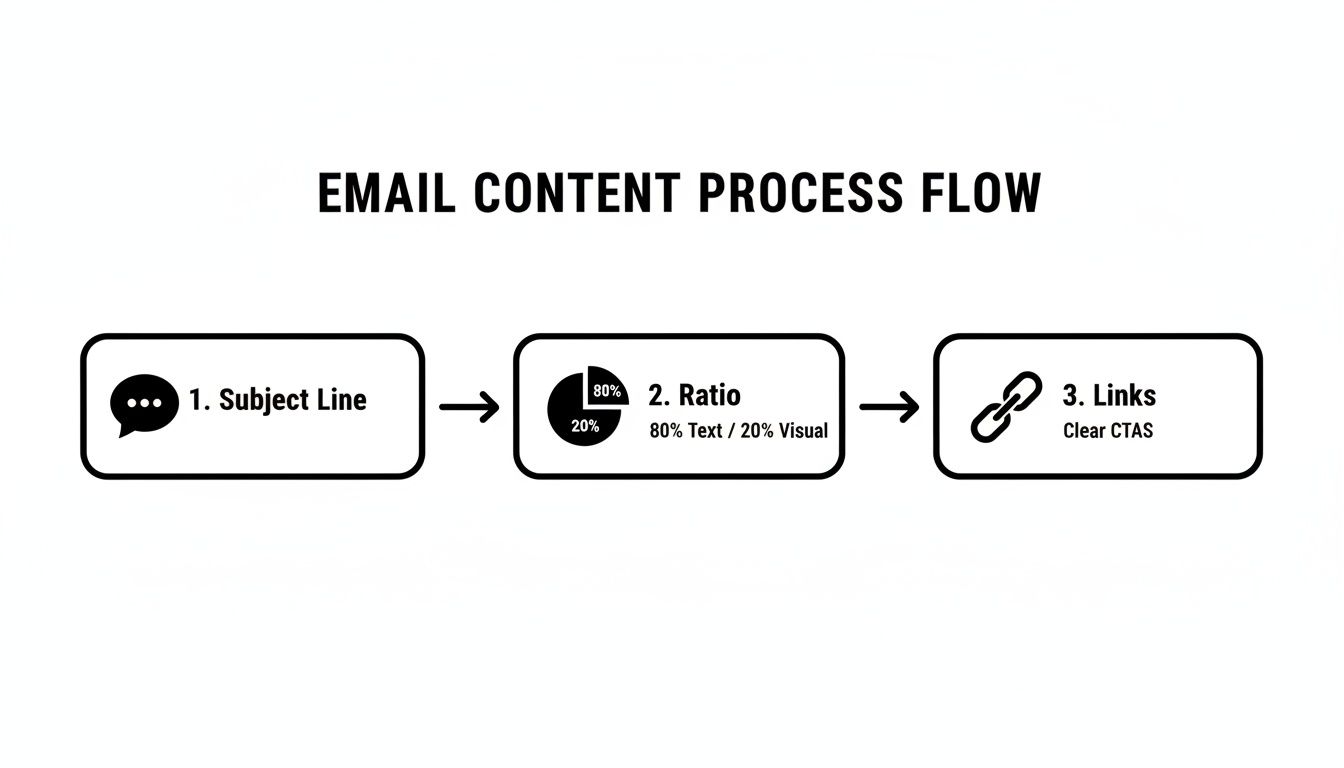
It’s a great visual reminder of how a strong subject line, a balanced mix of content, and clear, trustworthy links all work together to create an email that both people and algorithms will love.
Your Pre-Send Engagement Checklist
Before you hit "send," run through this quick mental checklist to catch potential problems before they can hurt your sender reputation.
- Is My Segment Right for This Message? Double-check that the content is truly relevant to the specific group you've chosen.
- Is the Subject Line Compelling? Does it spark curiosity without feeling like cheap clickbait?
- Is the Call-to-Action (CTA) Obvious? Make it crystal clear what you want the reader to do next.
- Have I Clicked Every Single Link? Make sure all links work and point to the right place.
- Is the "From" Name Instantly Recognizable? Use a consistent sender name that your subscribers will know immediately.
When you make engagement the core of your email strategy, you stop fighting against inbox providers and start working with them. You're no longer just trying to figure out how to avoid mail going to spam; you're focused on building a community that looks forward to what you have to say.
Your Questions on Email Deliverability Answered
Even with the best game plan, specific questions about keeping your emails out of the spam folder always come up. Here are answers to some of the most common challenges marketers face.
How Long Does It Take to Improve My Sender Reputation?
Improving a sender reputation is a marathon, not a sprint. It’s like building a credit score—you have to prove you’re trustworthy over time.
For a brand-new domain, plan for a 4-6 week warm-up period of sending a steady stream of engaging emails to build a good reputation from scratch.
If you're fixing a poor reputation, it could easily take 2-3 months or more of flawless execution. The key is relentless consistency: send valuable content to an engaged list, keep your complaint rates well below the 0.1% threshold, and ensure your technical authentication is perfect. Inbox providers reward predictable, positive behavior, but they don’t forget negative signals overnight.
Will Using Emojis in My Subject Line Land Me in Spam?
Used in moderation, no. In fact, a single, relevant emoji can help your subject line stand out in a crowded inbox. The danger comes from going overboard or using spammy-looking emojis (like 💰🔥🚀), especially when combined with other red flags like ALL CAPS.
Context is everything. A tasteful ☕ from your coffee shop’s newsletter is fine. Actionable Takeaway: A/B test your subject lines with and without emojis to see what your specific audience responds to, and always monitor your deliverability metrics.
Insight: The Promotions tab is not the spam folder. Landing there means Gmail has correctly identified your email as a marketing message. This is a sign of good deliverability, not a penalty.
Is It Bad If My Emails Land in the Gmail Promotions Tab?
Not at all. This is one of the biggest myths in email marketing. Landing in the Promotions tab means Gmail sees you as a legitimate marketer and is categorizing your mail correctly.
Trying to "game" the system to force your way into the Primary tab often involves tactics that look spammy to filters, which can backfire and wreck your reputation. Instead, focus on writing a compelling subject line that earns an open, no matter which tab it lands in. Many people intentionally browse the Promotions tab when they’re in a shopping mindset.
What Is the Single Most Important Thing to Avoid Spam Folders?
While technical setup like authentication is the non-negotiable foundation, the single most powerful action you can take is this: only email people who have explicitly and recently agreed to hear from you.
This is the heart of modern, permission-based marketing.
A clean, engaged list built on clear consent solves most deliverability problems before they start. It naturally leads to high open rates, low bounce rates, and almost zero spam complaints. When your audience genuinely wants your emails, inbox providers see those positive signals and reward you with consistent inbox placement.
For a more comprehensive look at what makes an email campaign successful from start to finish, exploring general expert tips for successful emails can help round out your strategy.
Summary and Your Next Step
To keep your emails out of spam, you need a holistic strategy. It starts with a technical foundation of email authentication (SPF, DKIM, DMARC) to prove you're a legitimate sender. From there, you must build and protect your sender reputation by sending valuable content to an engaged, permission-based list. Focus on smart segmentation, personalization, and proactive list cleaning to drive the positive interactions that inbox providers reward.
Recommended Next Step: Log into your domain registrar (like GoDaddy or Namecheap) and check your DNS records. Do you have SPF, DKIM, and DMARC set up correctly? If not, make that your number one priority. Most email service providers have simple guides to walk you through it.
EmailGum is your go-to resource for mastering every aspect of email marketing. Our in-depth guides and practical tutorials help you build, manage, and optimize your campaigns for maximum impact. Start boosting your engagement and conversions today by exploring our latest strategies at https://emailgum.com.