Cleaning your email list is one of the most important tasks in modern email marketing. It’s the process of regularly removing invalid, bounced, or inactive subscribers to keep your audience fresh and engaged. Think of it as essential maintenance for your marketing engine—it boosts deliverability, improves your engagement rates, and saves you money by ensuring you’re only sending emails to people who genuinely want to hear from you.
Why a Clean Email List Is Your Biggest Asset

I like to think of an email list like a garden. When you first plant it, everything looks vibrant. But if you neglect it, weeds start to creep in, choking out the healthy plants you’ve worked so hard to grow. That’s exactly what happens to an uncleaned email list—it slowly but surely undermines your marketing efforts.
This isn’t just a metaphor; it’s a real and constant problem known as email list decay. Even the most carefully built lists degrade as people change jobs, switch email providers, abandon old accounts, or make a simple typo during signup. This decay happens faster than most marketers realize.
The Real Cost of a Dirty Email List
Let's walk through the cascading effect of a neglected list. What starts as a few bad emails can quickly spiral into major deliverability and revenue problems.
| Problem Area | Direct Consequence | Long-Term Impact |
|---|---|---|
| High Bounce Rates | Damages your sender reputation with ISPs. | Your emails are more likely to land in spam for everyone. |
| Low Engagement | Skews your campaign metrics (opens, clicks). | You make poor marketing decisions based on inaccurate data. |
| Wasted Spend | You pay your ESP for subscribers who don't exist. | Lower ROI and a bloated marketing budget. |
| Spam Complaints | Signals to email providers that your content is unwanted. | Can lead to being blacklisted by major providers like Gmail. |
| Poor Deliverability | Fewer of your emails actually reach the inbox. | Lost sales opportunities and reduced customer lifetime value. |
As you can see, a dirty list isn't just a minor annoyance—it's a direct threat to the effectiveness and profitability of your entire email marketing program.
The Unseen Cost of List Decay
Here's a modern industry insight that should get your attention: email lists naturally decay at an alarming rate of about 28% per year. That means out of every 100 subscribers you have today, nearly 30 could be worthless by this time next year. This decay rate has been creeping up, from 22% in 2022 to 28% in 2024, mostly because of how often people switch jobs and abandon old email accounts.
When you send campaigns to a list riddled with these decayed addresses, you're sending all the wrong signals to providers like Gmail and Outlook. Every hard bounce from an invalid address chips away at your sender reputation.
A low sender reputation is the digital equivalent of a bad credit score. It tells inbox providers your emails might not be trustworthy, making it far more likely that even your legitimate messages end up in the spam folder.
A high bounce rate is a massive red flag. If you’re seeing this, it’s a clear signal you need to act fast. We have a detailed guide that walks you through exactly how to improve email deliverability by tackling these critical issues head-on.
Reframing List Cleaning as a Business Strategy
Ultimately, cleaning your email list isn't just a tedious chore; it's a core business strategy. It’s the foundation of a healthy, profitable email marketing program. By regularly "weeding" your list, you guarantee your messages reach an engaged audience that wants to hear from you.
Here’s what a clean list really does for your business:
- Maximizes Your ROI by cutting costs on subscribers who will never convert.
- Boosts Your Engagement Metrics because you're reaching real, interested people.
- Protects Your Sender Reputation, which is your single most valuable asset in email marketing.
- Provides Accurate Data so you can make smarter decisions based on real audience behavior.
A smaller, highly engaged list will always outperform a massive, unmaintained one. It’s all about quality over quantity. The goal isn’t just to slash your subscriber count—it's to cultivate a high-value community that drives real results.
Spotting the Trouble Signs in Your List
Before you can clean your email list, you need to know what to look for. Your email analytics are packed with clues about the health of your list, and learning to read them is the first step toward getting your deliverability back on track. This isn't just about catching the big, obvious failures; it's about spotting the subtle signs of decay before they do real damage to your sender reputation.
Most of the time, the biggest red flags are hiding in plain sight inside your email service provider's (ESP) dashboard. A climbing bounce rate, even if it’s just a fraction of a percent over a few months, is a huge warning sign. The same goes for a slow, steady decline in your average open rate—that’s a clear signal that your audience is losing interest.
Distinguishing Between Hard and Soft Bounces
It’s crucial to know that not all bounces are created equal. Understanding the difference is key to taking the right action. A "bounce" is simply a "return to sender" message from the recipient's email server.
- Hard Bounces: This is a permanent failure. The email address is invalid, fake, or simply doesn't exist anymore. There's zero chance your email will ever get through. These must be removed immediately.
- Soft Bounces: This is a temporary problem. The most common culprits are a full inbox, a server that’s temporarily offline, or an email that’s too large.
Most ESPs will remove hard bounces automatically after the first failure. Soft bounces, however, need your attention. If an address soft bounces a few times in a row—for example, across three different campaigns—it’s time to treat it like a hard bounce and remove it from your list.
The Silent Engagement Killers
Bounces are noisy problems, but other types of subscribers are silently poisoning your list's health. They’re often harder to spot but can be far more damaging in the long run.
Inactive Subscribers
These are real people who signed up but have simply stopped opening or clicking on your emails. They often make up the largest chunk of an unhealthy list. Keeping them might feel good for your subscriber count, but it tanks your engagement rates. That tells inbox providers like Gmail and Outlook that your content might not be very interesting.
Spam Traps
These are the landmines of email marketing. A spam trap is an email address used by Internet Service Providers (ISPs) and anti-spam organizations to catch senders with poor list management habits. Hitting even one can get your domain blacklisted. They often look like normal email addresses, but they’re set up specifically to identify marketers who aren't following best practices.
Here's a quick look at how a spam trap works:
As the diagram shows, the moment your email hits a spam trap, your IP address gets flagged. This can lead to severe penalties for your ability to reach the inbox.
Role-Based Emails
These are addresses tied to a position, not a person—think info@, admin@, or support@. While some might be legitimate subscribers, they generally have very low engagement and a much higher complaint rate because the person checking that inbox probably isn't the one who originally signed up.
The goal isn't just to remove bad addresses. It's to build a list of people who actually want to hear from you. An inactive subscriber who never opens your emails is just as costly as a bounced address because both drag down your sender score.
Here's an actionable first step: log into your email platform and create a segment of subscribers who haven't opened your last 15 emails or haven't clicked a single link in the past six months. This gives you a clear list of disengaged contacts to start with.
How to Clean Your Email List: A Step-by-Step Process
Alright, you’ve spotted the warning signs. Now it's time to roll up our sleeves and actually clean your list. This isn't just about deleting contacts; it's a strategic, step-by-step process for getting your list back in top shape without losing valuable subscribers.
We'll tackle this with a proven, three-step plan. First, we’ll do a technical scrub to get rid of invalid addresses. Then, we’ll focus on winning back people who have gone quiet. Finally, we'll remove those who are truly gone for good.
This approach surgically targets the three biggest culprits that drag down your list’s health: bad addresses that cause bounces, inactive subscribers who kill your engagement rates, and dangerous spam traps that can get you blacklisted.
Here’s a quick look at the main targets in our cleaning process.
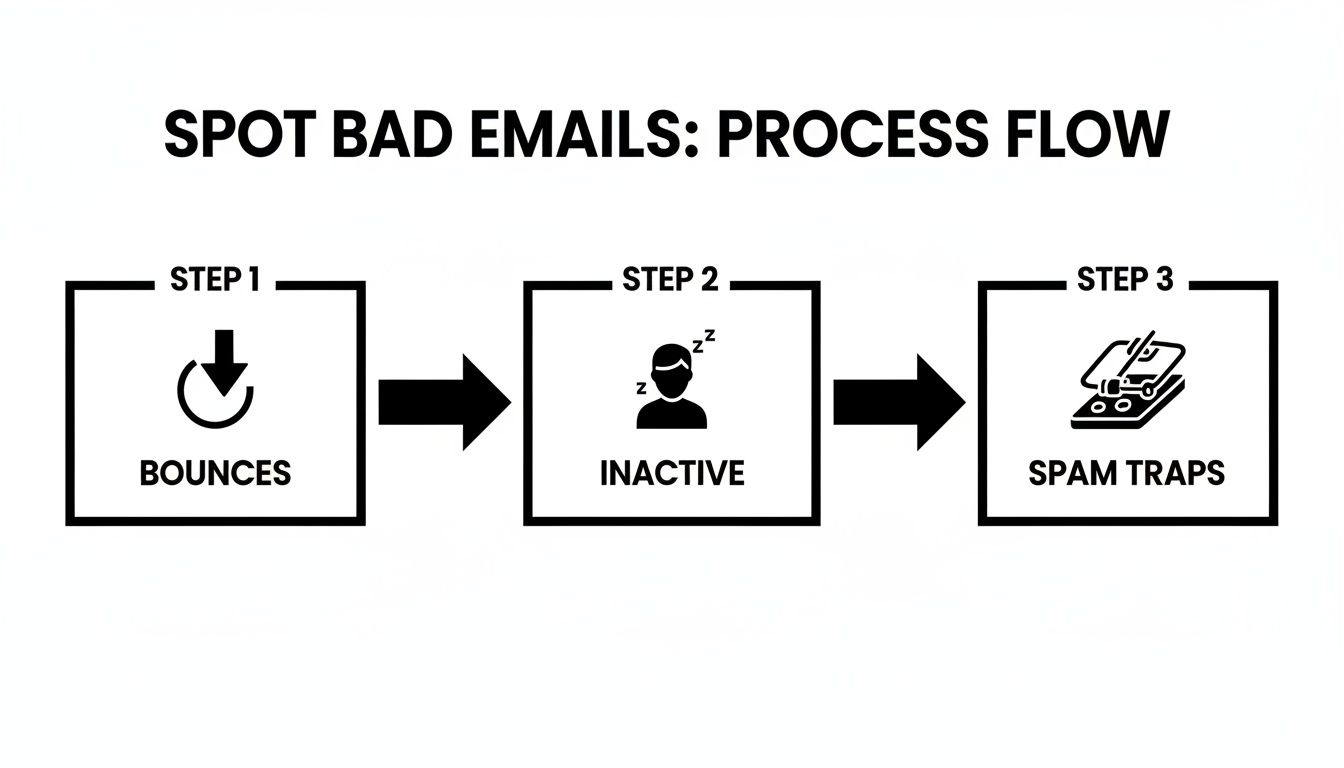
As you can see, it’s a logical flow: we start by weeding out the hard bounces, then filter the subscribers who’ve gone silent, and finally, sniff out any dangerous spam traps to keep your sender reputation safe.
Step 1: Run Your List Through an Email Verification Service
Before you send another campaign, your first move is non-negotiable: run your entire list through a third-party email verification tool. This is the single fastest and most reliable way to remove all the technical junk—the misspelled, invalid, risky, and fake email addresses that cause hard bounces.
Your email service provider (ESP) can't do this for you. These are dedicated tools that use complex checks to see if an email address is valid and can receive mail, all without actually sending an email. They're designed to find and flag several kinds of problem accounts:
- Invalid Emails: Addresses with typos (like
jane@gamil.com) or those using domains that don't exist. - Disposable Emails: Temporary, throwaway addresses people use to grab a freebie and then disappear.
- Role-Based Emails: Addresses like
info@,support@, oradmin@that have low engagement. - Spam Traps: The hidden landmines we talked about earlier. Hitting one of these can seriously damage your sender reputation.
The market for these services is growing for a reason. With list decay rates hitting 20-30% annually, businesses are realizing that clean lists aren't a luxury—they're a necessity, especially for B2B tech and e-commerce companies where a dirty list can lead to spam flags or penalties under rules like GDPR.
Step 2: Launch a Smart Re-Engagement Campaign
Once you’ve scrubbed all the technically bad addresses, it's time to focus on the biggest group on most email lists: the inactive subscribers. These are real people with valid email addresses who, for whatever reason, have stopped engaging with your content.
Simply deleting them is a missed opportunity. Instead, this is your chance to launch a targeted re-engagement (or "win-back") campaign. The goal is simple: get their attention one last time and ask if they still want to be on your list.
A re-engagement campaign is more than just list cleaning; it's relationship repair. You're giving your quiet subscribers a chance to speak up and reminding them why they signed up in the first place.
This doesn't have to be a complicated effort. A straightforward two-or-three-email sequence is usually all it takes.
Example Win-Back Sequence You Can Use Today
Email 1 Subject: Is this goodbye?
- Content: Send a friendly, low-pressure email. Acknowledge their absence ("Hey, we've missed you!") and remind them of the value they're missing ("You haven't seen our latest tips on..."). Use a single, clear call-to-action button: "Yes, Keep Me on the List!"
- Real-world Example: A retail brand might offer a small "welcome back" discount, while a SaaS company could highlight a new feature they've released.
Email 2 Subject: A final chance to stay in the loop
- Content: Send this 3-5 days later, but only to those who didn't open the first email. This one is more direct. Let them know you're cleaning your list to ensure you only send valuable content. Reiterate the benefits one last time and include the same "Keep Me on the List!" button. A little urgency, like mentioning it’s their last chance, works well here.
As you work through these steps, always keep in mind that great deliverability is the end goal. If you want to dive deeper into that topic, there are some great resources on how to improve email deliverability.
Step 3: Remove and Suppress the Unresponsive
This is the final, decisive step. It's time to handle everyone who ignored your re-engagement campaign. These are the contacts you can now remove with confidence. After your win-back campaign concludes, simply create a new segment of everyone who didn't open or click any of your re-engagement emails.
But don't just hit "delete." The best practice is to export their email addresses and add them to your suppression list.
A suppression list is your ESP's permanent "do-not-email" list. It acts as a block, ensuring those addresses can't be accidentally re-uploaded and emailed again. This is a crucial final step for a few reasons:
- It Protects Your Reputation: You guarantee you won't email people who've made it clear they're not interested, which prevents future spam complaints.
- It Prevents Human Error: If a colleague later imports an old file containing these same addresses, the suppression list will automatically block them.
- It Preserves Your Data: You stop paying for them as active subscribers, but you can often keep their contact record for historical analysis.
By following this three-step framework—verify, re-engage, and suppress—you create a reliable and safe system for cleaning your list that maximizes retention while decisively cutting the dead weight.
How to Choose the Right Email Verification Tool
Once you've decided to clean up your email list with a dedicated service, you'll find a crowded market of options. However, not all email verification tools are created equal. Picking the wrong one can be almost as damaging as not cleaning your list at all. This isn't about finding the cheapest option—it's an investment in accuracy and protecting your sender reputation.
Core Features You Cannot Compromise On
When comparing services, a few features are completely non-negotiable. Think of these as the foundational pillars that separate a trustworthy tool from a risky one.
High Accuracy Guarantee: Look for providers that promise at least 98% accuracy. Anything lower isn't worth the risk. A reliable tool should confidently distinguish between valid, invalid, and tricky "catch-all" email addresses.
Spam Trap Detection: This is one of the most critical functions. The best tools maintain their own network to identify and flag known spam traps, which is your best defense against getting blacklisted.
Comprehensive Validation Checks: A proper service runs multiple layers of checks. This includes syntax validation (catching typos like
jane@gamil.com), domain verification to see if the domain is valid, and real-time pings to the mail server to confirm an inbox actually exists. For a deeper look at this process, our guide explains how to verify an email address quickly and accurately.
These technical checks are what make a professional service so valuable. They perform a deep-dive analysis that you can't replicate manually or through your email marketing platform alone.
Integrations and Real-Time APIs
Manually exporting and importing CSV files is a headache. A great tool should integrate seamlessly into your existing marketing workflow.
Think of a real-time API as a bouncer at the door of your email list. It checks every new email address for validity the moment a user hits "subscribe," stopping bad data from ever getting in.
A couple of integrations are key:
- ESP Connections: Look for direct links to platforms you already use, like Mailchimp, HubSpot, or Klaviyo. This allows you to sync and clean your lists automatically.
- Real-Time Validation API: This is a must-have for preventing typos and fake emails at the point of entry. It validates addresses instantly on your website forms, landing pages, and checkout pages.
As you explore your options, a good directory of marketing SaaS companies can be a fantastic resource for discovering specialized verification tools you might not have found otherwise.
Comparing Email Verification Service Features
This table breaks down the essential features you should look for, what they do, and why they're important for keeping your list healthy.
| Feature | What It Does | Why You Need It |
|---|---|---|
| Email Syntax Check | Verifies the email address format (e.g., checks for the @ symbol). | Catches basic typos and formatting errors instantly. |
| Domain/MX Record Check | Confirms the domain exists and can receive emails. | Prevents sending to non-existent domains, which cause hard bounces. |
| Spam Trap Detection | Identifies emails used by ISPs to catch spammers. | The most important feature for protecting your sender reputation. |
| Real-Time API | Validates emails at the moment of capture on your forms. | Stops bad data from ever entering your list, keeping it clean from the start. |
| Bulk Verification | Allows you to upload and clean an entire list at once. | Essential for cleaning your existing database or newly acquired lists. |
| ESP Integrations | Connects directly to platforms like Mailchimp or Klaviyo. | Automates the cleaning process, saving you time and eliminating manual errors. |
By prioritizing tools that excel in these key areas, you're not just cleaning your list—you're implementing a long-term strategy for better deliverability and engagement.
Understanding Pricing Models
Email verification services usually fall into one of two pricing models. The right choice depends on your list size and how often you clean it.
Pay-As-You-Go: Perfect for one-time list cleanups or occasional use. You buy a set number of credits, and they often don't expire.
Monthly Subscription: If your list is constantly growing and you plan on cleaning it regularly, a subscription is usually more cost-effective. You typically get a lower cost-per-email and monthly API calls included.
For most businesses, starting with a pay-as-you-go plan is a smart move. It lets you do an initial deep clean without a long-term commitment. As your list grows, a monthly subscription often becomes the better option.
Building Habits for Long-Term List Health

A deep clean feels great, but the secret to a high-performing email list isn't a one-time event. It's about building consistent habits. Lasting success comes from proactive strategies that keep your list healthy from the moment someone subscribes, stopping major problems before they start.
Think of it as preventative care. Instead of performing major surgery once a year, you’re practicing daily wellness. This approach will save you massive headaches and ensure your list remains a powerful business asset.
Make Double Opt-In Your Best Defense
If you adopt only one habit, make it this one: implement double opt-in for every new subscriber. This is your strongest defense against typos, fake emails, and bots polluting your list.
It’s a simple, two-step process:
- A user fills out your subscription form.
- They immediately receive an automated email asking them to confirm their subscription by clicking a link.
- They are only added to your active list after they click that confirmation link.
That extra click is a game-changer. It guarantees every email address is valid, belongs to a real person, and that the owner genuinely wants to hear from you.
Catch Typos with Real-Time Validation
Your next proactive move should be using a real-time validation API on your signup forms. Most quality email verification tools offer this feature, which checks an email for validity before the user can even hit "submit."
For example, if someone tries to sign up with jane@gamil.com, the API instantly catches the typo and prompts them to correct it to jane@gmail.com. This small, automated check drastically reduces invalid addresses from the start.
Proactive list hygiene is about shifting from a reactive "clean-up" mindset to a preventative "keep-clean" mindset. Double opt-in and real-time validation are the two most powerful tools for making this shift.
Schedule Your Regular Maintenance
Just like any valuable asset, your email list requires scheduled maintenance. Don't wait until your open rates plummet. Get ahead of it by putting a recurring event on your calendar to review your list's health. For most businesses, a quarterly review is the perfect cadence.
Your quarterly check-in could simply involve:
- Running your newest segment of subscribers through a verification tool.
- Identifying subscribers who have been inactive for the last 90 days.
- Launching a re-engagement campaign for that inactive group.
This routine turns a daunting chore into a manageable part of your marketing workflow. The impact of this consistency is huge. Regular cleaning can boost open rates by up to 20%. In fact, once inactive subscribers creep above 5%, open rates can drop from a healthy 24.8% to a mere 15.2%.
Implement a Sunset Policy
A sunset policy is an automated rule that gracefully phases out chronically disengaged subscribers. It’s a set-it-and-forget-it way to maintain list hygiene.
Here’s a simple framework to get started:
- Define Inactivity: Decide what "inactive" means for you (e.g., no opens or clicks in 120 days).
- Automate Tagging: Set up a rule in your ESP to automatically tag subscribers who meet this criteria.
- Trigger a Re-Engagement Flow: Use this tag to automatically enroll them in your win-back campaign.
- Automate Removal: If they don’t engage with the campaign, another rule can automatically unsubscribe them and add them to your suppression list.
This process works tirelessly in the background, ensuring only your most interested fans remain on your list. This strategy becomes even more powerful when combined with smart segmentation. To learn more, check out our guide on what is email segmentation.
Common Questions About Email List Cleaning
Even with a solid plan, a few questions often pop up. Let’s tackle some of the most common ones so you can clean your list with confidence.
How Often Should I Clean My Email List?
As a solid rule of thumb, aim for a deep clean quarterly, or about every 90 days. That’s the sweet spot for most businesses.
However, if your list is growing rapidly and you email daily, you may want to tighten that up to a monthly review. If you only send campaigns once a month, stretching it to every six months is perfectly fine. The one hard rule is to never let it go for more than a year.
Is It Okay to Just Delete Inactive Subscribers?
You can, but it's not the best first step. Before you hit delete, you should always run a re-engagement campaign. Think of it as a final, strategic effort to win them back. A simple, friendly "Hey, do you still want to hear from us?" email can work wonders. You’d be surprised how many subscribers just got busy and need a little nudge to re-engage. Only after they’ve ignored your win-back attempts should you remove them.
Will Cleaning My List Make It a Lot Smaller?
Yes, it probably will—and that’s a good thing. It's time to stop focusing on the vanity metric of list size. Success in email marketing is about engagement, not sheer volume.
A dialed-in list of 5,000 fans who open, click, and buy from you is infinitely more valuable than a bloated list of 50,000 who ignore your emails. A leaner list means better deliverability, higher open rates, and more meaningful results.
What Is a Suppression List and Why Do I Need One?
A suppression list is your permanent "do not contact" list inside your email service provider (ESP). When you remove people—whether they're hard bounces, unsubscribes, or those who ignored your re-engagement campaign—you should add them to this list. This isn’t an optional step; it’s a critical one. It's your safety net. It prevents you (or a well-meaning teammate) from accidentally re-uploading an old list and emailing those same problematic contacts again, protecting your sender reputation.
Summary and Your Next Step
Maintaining a clean email list is not a one-time task but an ongoing strategy that is essential for high engagement, strong deliverability, and a healthy ROI. By regularly verifying addresses, re-engaging inactive subscribers, and using proactive tools like double opt-in, you ensure your messages reach an audience that is genuinely interested in what you have to say.
Recommended Next Step: Schedule your first quarterly list review on your calendar right now. Identify subscribers who haven't engaged in the last 90 days and plan a simple two-email re-engagement campaign to run next week.