The "HTML vs. plain text email" debate is a classic in marketing, but treating it as a simple design choice is a rookie mistake. The format you choose has a real, measurable impact on whether your email lands in the inbox, gets opened, and drives action.
HTML lets you create beautiful, on-brand campaigns with stunning visuals and interactive elements. On the flip side, a simple plain text email can feel incredibly personal and direct, cutting through the noise like a personal note. This isn't just about looks—it's a strategic choice that should align with your campaign's specific goal. Let's break down when to use each format to get the best results.
HTML vs. Plain Text: Understanding Your Tools
Before you can pick the right format, you need to understand what each one does. Think of it like a toolkit: you wouldn't use a sledgehammer to hang a picture frame. HTML and plain text are different tools for different jobs. Neither is inherently "better"; their power comes from using them in the right situation, for the right audience.
An HTML (HyperText Markup Language) email is essentially a mini-webpage delivered to an inbox. It uses code to manage the layout, colors, fonts, and images, giving you complete creative control over the user experience.
A plain text email is exactly what it sounds like—just text. No special formatting, no images, and no tracking pixels. It’s the digital equivalent of a typewritten letter, where the message itself is the absolute focus.
Key Differences at a Glance
So, where do they really differ? Understanding the core trade-offs is the first step. Each format has its own strengths that affect everything from brand perception to whether your email gets flagged as spam.
| Feature | HTML Email | Plain Text Email |
|---|---|---|
| Visuals & Branding | Full control. You can use images, logos, and custom brand fonts. | Stripped back to basics. Limited to standard text characters. |
| Tracking & Analytics | Robust. Enables open tracking, click heatmaps, and other deep metrics. | Limited. Only link clicks can be tracked; no open tracking is available. |
| Deliverability | Can be tricky. Poorly coded emails are a red flag for spam filters. | Generally excellent. Far less likely to trigger spam filters. |
| Reader Experience | Creates a rich, scannable, and visually engaging experience. | Offers a personal, 1-to-1 feel, like a direct conversation. |
| Compatibility | Renders differently across email clients. What looks great in Gmail might break in Outlook. | Flawless. Renders perfectly on every email client and device, every time. |
The best email marketers don’t pick one format and stick with it. They master both. They know exactly when to send a beautifully designed promo and when to switch to a simple, personal note to close a deal or build a relationship.
Choosing between HTML and plain text isn't a technical decision. It's a communication strategy.
A Head-to-Head Comparison of Email Formats
Choosing between HTML and plain text email isn't just about aesthetics. It's a strategic decision that shapes how people perceive your brand, the experience they have, and how effectively you can measure success. Let's dig into how each format stacks up where it really counts.
Brand Identity And Visual Appeal
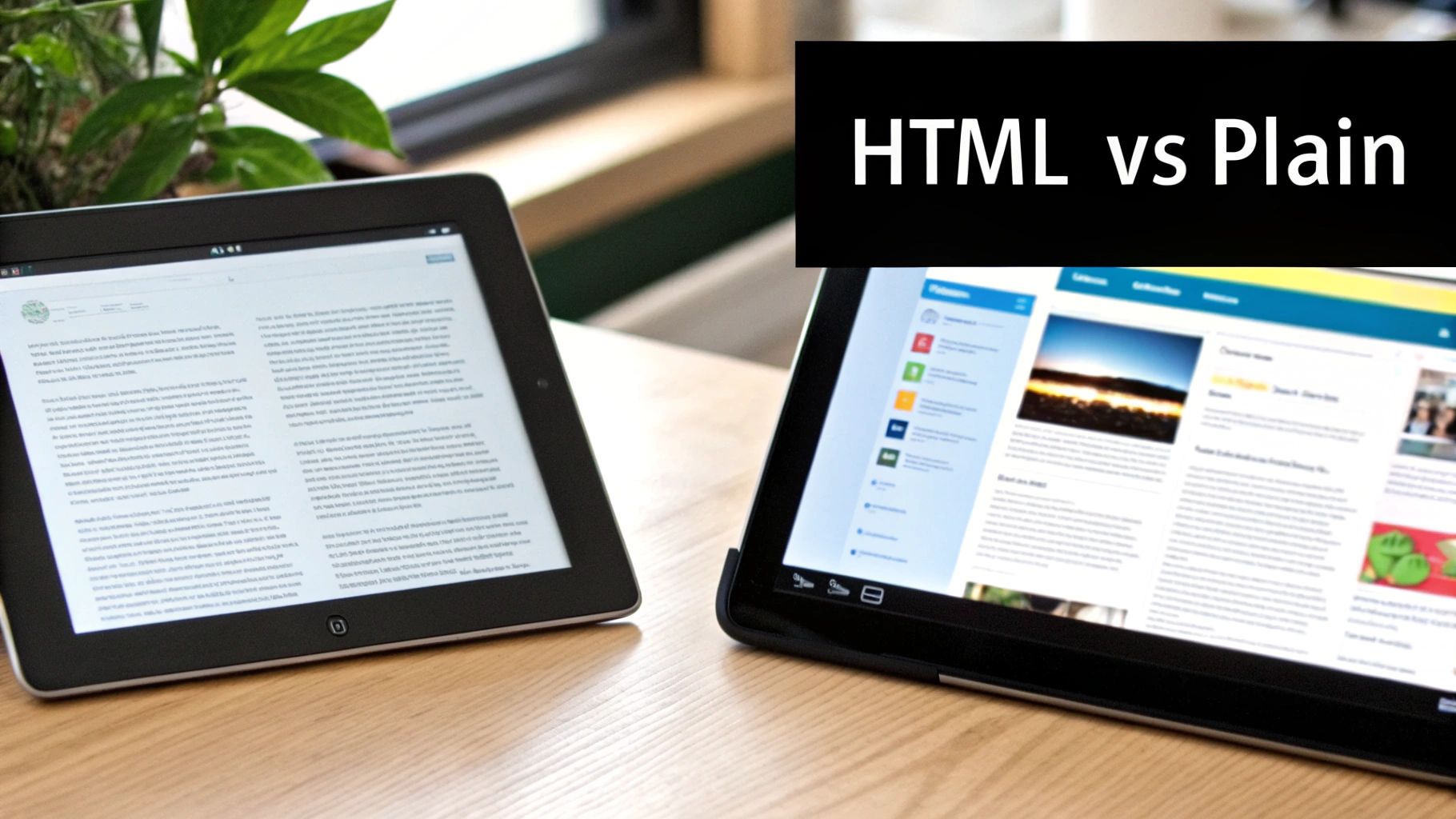
When you need to make a strong, memorable brand statement, HTML is the undisputed champion. It gives you the power to use your logo, specific brand colors, and custom fonts, creating an experience that feels like a natural extension of your website.
Real-World Example: Think about an e-commerce brand like Nike. With HTML, they can showcase new sneakers with stunning images and big, bold "Shop Now" buttons that pull the customer in. Plain text, on the other hand, lives and dies by the power of its words. While that can create a deeply personal feel, it offers zero visual branding—a tough trade-off for most consumer-facing businesses.
User Experience And Engagement
This is where the debate gets interesting, because the best user experience (UX) depends entirely on your goal. HTML emails use layouts, headings, and clear calls-to-action (CTAs) to guide the reader’s eye, making the message easy to scan and act on.
A well-designed HTML email is easy to scan, letting busy subscribers get the gist and take action in seconds. In fact, some analyses show that emails with images can get 42% higher click-through rates than those without.
But there's a catch. A badly coded HTML email is a user's nightmare, filled with broken images and jumbled text that kills trust instantly. Plain text emails, however, are foolproof. They deliver a consistent, reliable experience every single time, on any device. Their raw simplicity can feel incredibly personal—almost like getting a message from a friend—which can do wonders for engagement in certain scenarios.
Analytics And Tracking Capabilities
If you rely on data to drive your marketing strategy, HTML is your most powerful option. It allows you to embed a tiny, invisible tracking pixel into the email, unlocking a world of metrics that plain text just can't provide.
With HTML, you can track:
- Open Rates: See how many people opened your email (though this is becoming less accurate with privacy features like Apple's Mail Privacy Protection).
- Click-Through Rates: Find out exactly which links and buttons got the most attention, giving you direct insight into what your audience wants.
- Heatmaps: Get a visual map of where subscribers are clicking, so you can optimize future designs for maximum impact.
Plain text offers almost no native tracking. The best you can do is monitor clicks on any URLs you include, which makes it nearly impossible to run effective A/B tests or measure the true ROI of your campaigns. To get the most out of your tracking, mastering the visual side is crucial; it’s always a good idea to review some email design best practices to ensure your campaigns are hitting the mark.
Accessibility And Compatibility
On this front, plain text has a massive advantage. It's universally compatible with every email client, device, and screen reader out there—no exceptions. This guarantees your message will appear exactly as you wrote it, with zero rendering headaches.
This is a huge deal for audiences who use assistive technologies or live in areas with slow internet. HTML emails can be finicky, rendering differently across Gmail, Outlook, and Apple Mail. What looks perfect on your screen might look completely broken to some of your subscribers, damaging your brand's credibility. For a great deep dive into this topic for e-commerce, check out this analysis from Html Or Plain Text Email: Which Format Wins For Shopify?.
To make sense of these trade-offs, a simple side-by-side comparison is the best way to see the full picture.
HTML vs Plain Text Email at a Glance
Here’s a quick breakdown of how these two formats compare across the most important attributes. This table cuts straight to the chase, helping you see the core strengths and weaknesses of each option.
| Attribute | HTML Email | Plain Text Email |
|---|---|---|
| Brand Identity | Excellent. Full control over logos, colors, and fonts to create a strong visual brand. | None. Limited to text characters, offering no visual branding capabilities. |
| User Experience | Can be highly engaging and scannable, but risks rendering errors and slow load times. | Extremely reliable and personal, but lacks visual hierarchy and scannability. |
| Tracking | Robust. Enables open tracking, click heatmaps, and detailed performance analytics. | Minimal. Only allows for basic link click tracking; no open rate data is available. |
| Accessibility | Can be challenging. Requires careful coding (alt text, semantic tags) for screen readers. | Perfect. Universally accessible and compatible with all devices and assistive technologies. |
Ultimately, it all comes down to what you're trying to achieve. Are you launching a new product and need that big brand splash? Or are you building a personal, trust-based connection with a high-value lead? Answering that question will point you to the right format.
How Email Format Affects Deliverability and Spam Filters
Getting your email into the inbox is the first—and most critical—hurdle of any campaign. The format you choose, whether polished HTML or simple plain text, plays a massive role in whether your message gets seen or buried in a spam folder. Internet Service Providers (ISPs) and their spam filters are the gatekeepers, and they scrutinize every element of an incoming email.

From a deliverability standpoint, plain text emails are about as safe as it gets. They are pure text with no hidden code, tracking scripts, or complex formatting. This simplicity makes them appear inherently less risky to a spam filter, which often translates to higher deliverability because there are far fewer technical red flags.
Navigating HTML and Spam Triggers
HTML emails are a different beast. Their complex code and rich media can look fantastic, but every line of that code is another opportunity for something to go wrong in the eyes of a spam filter.
Spam filters are particularly wary of a few common HTML-related issues:
- Messy or Broken Code: Sloppy HTML, unclosed tags, or code pasted from a word processor can signal a low-quality, amateur, or even malicious email.
- Excessive Images: Emails that are one giant image or have a poor text-to-image ratio are classic spammer tactics used to hide sketchy words from filters.
- Suspicious Links: Using link shorteners or having links where the display text doesn't match the destination domain can raise immediate suspicion.
Spam filters work on a scoring system. Every potential issue—from a large image file to a "spammy" phrase—adds points. Once an email's score hits a certain threshold, it's routed to junk. Plain text emails basically start with a score of zero.
The bottom line? A well-coded HTML email from a reputable sender will almost certainly reach the inbox. But a plain text message nearly always has an easier path.
The Impact of Complexity on Open Rates
It’s not just about getting into the inbox; the complexity of an HTML email can also affect whether it gets opened. In a study by HubSpot, plain text emails consistently beat out their HTML counterparts in open rates. The gap got even wider as the HTML emails became more complex.
For instance, their A/B tests showed that HTML emails had open rates drop by as much as 37% when GIFs were added compared to plain text versions with the exact same copy. This suggests that even when HTML emails land safely, subscribers often perceive simpler, text-based messages as more personal and trustworthy, driving them to open and engage.
Step-by-Step: Creating Inbox-Friendly HTML
This doesn't mean you should ditch HTML. The trick is to build emails that are "inbox-friendly" by balancing great design with deliverability best practices.
Here are a few actionable steps to keep your HTML emails out of the spam folder:
- Maintain a Healthy Text-to-Code Ratio: Ensure you have a good amount of actual text content in your email's body relative to the amount of HTML code. A good rule of thumb is a 60/40 text-to-image ratio.
- Optimize Your Images: Always compress your images to keep file sizes down and always include descriptive alt text. This is crucial for accessibility and helps you avoid getting flagged.
- Use a Reputable Email Service Provider (ESP): Platforms like Mailchimp or ConvertKit have built-in tools to ensure your HTML is clean, compliant, and optimized for delivery. They do a lot of the heavy lifting for you.
Mastering these basics is a great start. For a more complete playbook, check out our guide on how to improve email deliverability for more advanced strategies. It’s also important to understand the bigger picture of why emails go to spam in the first place.
Choosing the Right Format to Maximize Conversions
An open is a victory, but a conversion is the real goal. Your choice between an HTML or plain text email psychologically primes your audience for different kinds of action. The format you pick can either build a foundation of trust or create the visual urgency needed to close a sale.

This decision comes down to one simple question: What specific action do you want them to take? Are you nurturing a high-value lead through a long sales cycle, or are you trying to sell a product during a weekend flash sale? Your answer dictates the format.
The Personal Connection of Plain Text
When your main goal is to build trust and foster a relationship, plain text is surprisingly powerful. Its simple, unadorned nature looks and feels like a one-to-one conversation, not a mass marketing blast. It reads like a personal note from a real person.
This psychological effect is perfect for situations where a hard sell would feel jarring. For example, a B2B sales follow-up after a demo or a welcome email from a company's founder. The message feels authentic and direct, which encourages replies and gently nudges a lead toward a long-term conversion.
The core strength of plain text is its ability to disarm the reader. When an email doesn't look like an advertisement, the subscriber's guard comes down, making them more receptive to the message and more likely to trust the sender.
This trust leads directly to action. A detailed study by Litmus found compelling evidence that 60% of conversions from existing customers came from plain text emails compared to HTML versions. In their A/B tests, customers who received plain text versions had higher open and click-through rates, which ultimately drove this massive conversion advantage. You can dig deeper into how email format impacts conversions and see the data for yourself.
The Visual Power of HTML for E-Commerce
While plain text masters relationship-building, HTML is the undisputed king of e-commerce conversions. When you need to showcase a product, there's no substitute for high-quality images, branded colors, and bold, clickable buttons.
Real-World Example: Imagine a retail brand announcing a 24-hour flash sale. A plain text email just can’t create the same sense of urgency or visual appeal as an HTML email with eye-catching product photos and a can't-miss "Shop Now" button.
Here’s where HTML has a clear edge for driving immediate sales:
- Show, Don't Just Tell: Display products in action, helping customers visualize themselves using them and shortening the path to purchase.
- Clear Calls-to-Action (CTAs): Brightly colored, well-placed buttons are psychologically more compelling and easier to spot than a simple hyperlink, significantly boosting clicks.
- Creating Urgency: Visual cues like countdown timers or bold "Limited Time Only" graphics amplify the scarcity of an offer, prompting people to act now.
A travel company promoting a vacation package can use stunning destination photos in an HTML email to stir emotion and inspire bookings in a way plain text never could. The format lets the product—the experience—sell itself visually.
Matching the Format to the Conversion Goal
Maximizing conversions requires a strategic, not a dogmatic, approach to your email format. The right choice depends entirely on your campaign's context and the specific action you want your subscriber to take.
For a B2B tech company nurturing a lead, a personal, plain-text follow-up from a sales rep is often the best way to get a call on the calendar. But for a direct-to-consumer fashion brand launching a new collection, a visually rich HTML email is essential to drive online sales. When you align your format with your conversion goal, you create a far more effective and persuasive experience for your audience.
How to Implement a Hybrid Email Strategy
You don't have to choose a side in the "HTML vs. plain text" debate. The smartest play is a hybrid one where you send both versions simultaneously. This is possible thanks to an email standard called multipart MIME (Multipurpose Internet Mail Extensions), which bundles both HTML and plain-text formats into a single email.
When a multipart MIME email lands in an inbox, the recipient's email client—whether it's Gmail, Outlook, or a client on a smartwatch—chooses the best version to display. If it can render HTML, it shows your beautifully designed campaign. If it can’t, or if the user prefers plain text, it seamlessly defaults to the clean, readable text version.
This simple move ensures every subscriber gets the best possible experience, which is a huge win for accessibility and deliverability. As a bonus, spam filters often view the presence of a plain-text alternative as a positive signal—a sign of a legitimate, thoughtful sender.
Step-by-Step: Creating an Effective Plain Text Version
The biggest mistake marketers make is treating the plain-text version as an afterthought. Most email service providers (ESPs) auto-generate one, but it's often a jumbled mess of broken links and weird formatting. Taking a few minutes to clean it up is a small effort with a big payoff.
The goal is to make the text version just as clear and actionable as its HTML counterpart. Focus on pure readability and ensure every link works as intended.
Think of your plain-text version as your email's universal key. It guarantees that no matter the lock—a high-security email client, an old device, or a screen reader—your message can always get through.
You don't need complex tools. A few simple formatting tweaks can transform a messy block of text into a clean, professional message.
Your Plain Text Fallback Checklist
Before you hit "send" on your next campaign, run through this quick checklist to ensure your plain-text version is ready for any inbox.
- Use Markdown for Clean Formatting: Simple symbols make a world of difference. Use asterisks for bullet points (
* List item), hashes for headlines (## Section Title), and underscores for emphasis (_important text_). This adds a clean, scannable structure. - Make Links Clear and Clickable: Auto-generated text versions often dump long, ugly URLs into the copy. Clean them up by putting the full URL in parentheses right after your descriptive link text. For example:
Learn more about our new features (https://www.yourwebsite.com/features). It’s much cleaner and builds trust. - Ensure Message Consistency: Your plain-text version should carry the exact same core message, offer, and call-to-action as your HTML email. Don't strip out crucial information just because the format is simpler.
Thankfully, modern ESPs like Mailchimp and ConvertKit have built-in editors that make it easy to customize your plain-text version. By taking control of this process, you guarantee that every subscriber receives a clear, functional, and engaging email, every time.
Choosing Your Format: A Practical Framework
Picking between HTML and plain text shouldn't be a last-minute decision. It’s a strategic choice tied directly to what you want your email to accomplish. This framework will help you connect the dots between your goal, audience, and format to pick the right tool for the job, every time.
Your decision boils down to one simple question: What is the primary objective of this email? Answering this makes the right format obvious.
This flowchart visualizes the decision process, especially when considering a hybrid approach. Your goal should always guide the format choice, ensuring every subscriber gets the best possible version.
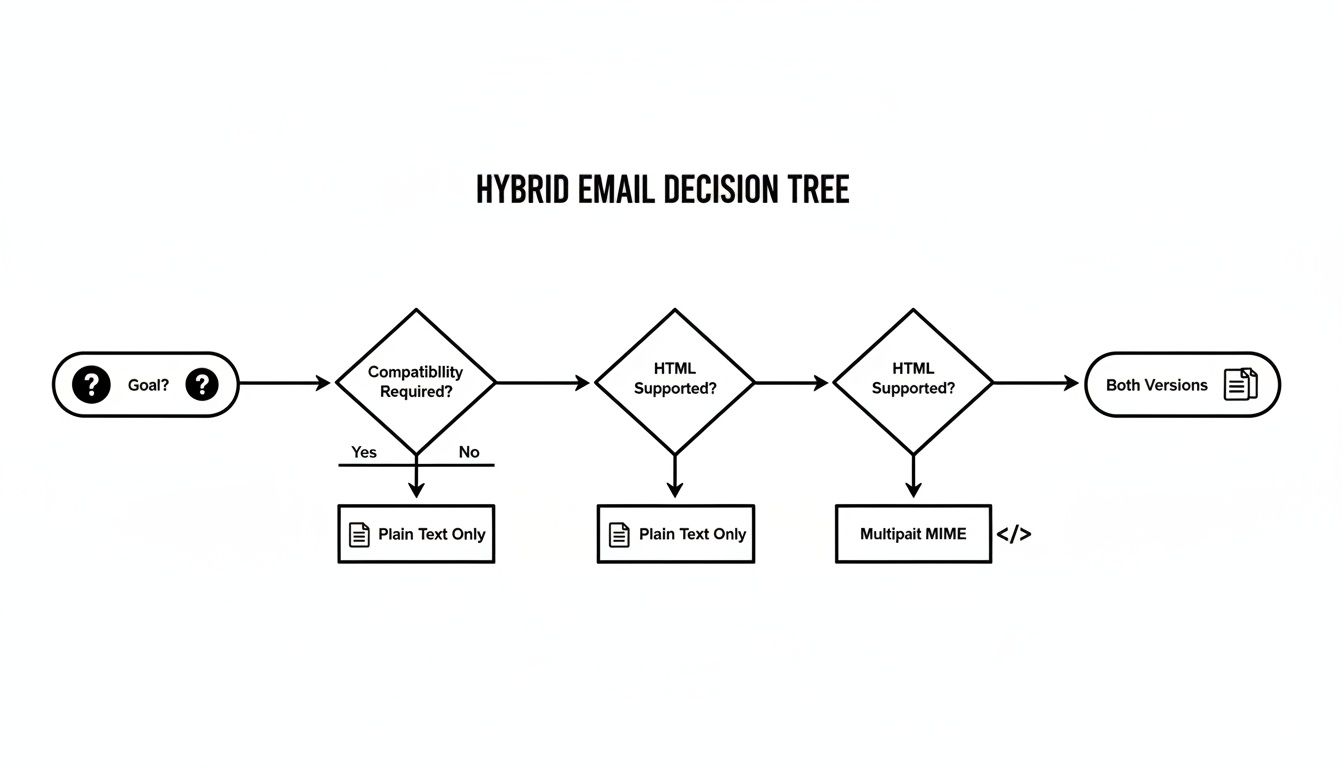
As you can see, the smartest strategy almost always involves both versions. Using multipart MIME lets you deliver the ideal experience to each recipient, no matter what email client they’re using.
When to Use Plain Text Emails
Plain text shines when your main goal is building trust, creating a personal feel, and ensuring maximum deliverability. Its raw simplicity makes it feel like a one-to-one conversation, which is incredibly powerful for cutting through marketing noise.
Go with plain text in these situations:
- Personal Outreach from a Founder: A simple, text-only welcome or thank-you note from a key person feels genuine and builds an immediate, authentic connection.
- High-Touch Lead Nurturing: When guiding a high-value lead through a sales process, a plain text email from a sales rep feels like a direct follow-up, not another automated marketing blast.
- Critical Announcements: For must-read updates like a security notice or a change in terms of service, plain text ensures the message gets delivered clearly to everyone, with zero distractions.
The real power of plain text is its ability to disarm the reader. When you strip away the polish of a marketing campaign, subscribers lower their guard. The message instantly feels more trustworthy and urgent.
In each of these cases, the format's simplicity is its greatest strength. All the attention goes straight to the message itself.
When to Use HTML Emails
HTML is your go-to when visual punch, brand consistency, and clear, clickable actions are what you need to hit your goal. It turns a simple message into a rich, interactive brand experience.
Deploy HTML for these use cases:
- E-commerce Promotions and Sales: You can't sell a product you can't see. High-quality product shots, on-brand colors, and big, bold "Shop Now" buttons are non-negotiable for driving revenue.
- Visually Rich Newsletters: When sharing curated content, HTML lets you use layouts, images, and visual hierarchy. This makes your newsletter scannable, engaging, and look completely professional.
- Major Product Launch Announcements: A big launch needs a big visual impact. HTML lets you show off new features, embed demo videos, and build a level of excitement that plain text just can't touch.
Each of these scenarios depends on visual storytelling to convince the subscriber to take a specific, high-value action. When you match the format to your marketing objective, you end up with a much more coherent and effective campaign.
Summary and Your Next Step
So, HTML or plain text? The truth is, there's no single winner. The best format depends on your audience, your message, and your goal.
- HTML is your glossy brochure, perfect for visual-heavy e-commerce promotions and branded newsletters where you need to guide the eye and drive clicks with strong calls-to-action.
- Plain text is your personal note, ideal for building trust, nurturing high-value leads, and ensuring critical announcements are delivered clearly and reliably.
The smartest strategy is a hybrid one. By using multipart MIME to send both an HTML version and a clean plain-text fallback, you guarantee a great experience for every subscriber, improve deliverability, and cover all your bases.
Recommended Next Step
Don't just take our word for it—let your audience tell you what works.
For your next campaign, run a simple A/B test. Send a rich HTML version to one half of your segment and a clean, personal plain-text version to the other half. Analyze the open rates, clicks, and replies to see which format drives the results you want for that specific goal. This single test will give you more clarity than any article ever could.
Ready to build, manage, and optimize your email campaigns with expert guidance? At EmailGum, we provide in-depth guides and actionable advice to help you master every aspect of email marketing. Get started for free and level up your results today!