So, you want to improve your email deliverability. What does that actually mean?
It’s simple: making sure your emails hit the inbox, not the spam folder. Getting this right is a mix of nailing the technical authentication, building a strong sender reputation, and sending content people actually want to read. Master these, and you’ll see more of your hard work land exactly where it should.
Why Your Emails Vanish and What to Do About It
Ever hit 'send' on a perfectly crafted email campaign and wonder why it never seems to get the traction it deserves? It’s a classic marketing headache, and the cure starts with understanding your sender reputation.
Think of mailbox providers like Gmail and Outlook as incredibly strict bouncers at an exclusive club. Their only job is to protect their users from junk. Your sender reputation is your ID. A good one gets you waved right in. A bad one? You’re getting sent to the spam folder out back, or maybe you won't even make it to the door.
Your reputation isn't just about avoiding a few spammy words. It's a comprehensive score based on your technical setup, your sending history, and how real people interact with your emails.
The Sobering Reality of Inbox Placement
This isn't a small problem. The issue is much bigger than most marketers realize. Right now, nearly 1 in 6 marketing emails fails to reach the primary inbox. It's a genuine deliverability crisis.
Recent data paints a pretty stark picture, showing a global average deliverability rate of just 83.1%. That means 10.5% of emails are routed to spam, and another 6.4% just disappear into the ether.
Let's break down what that looks like in the real world with a practical example.
The Journey of 10,000 Marketing Emails
| Status | Percentage | Emails Affected (out of 10,000) |
|---|---|---|
| Successfully Delivered to Inbox | 83.1% | 8,310 |
| Sent to Spam Folder | 10.5% | 1,050 |
| Blocked or Missing (Bounced) | 6.4% | 640 |
When you look at it this way, an average campaign to 10,000 subscribers means nearly 1,700 of them never even get a chance to see your message. That's a huge waste of effort and potential revenue. If you want to dive deeper into how to avoid this, exploring a full range of B2B email marketing best practices is a great next step.
This guide is your practical roadmap to earning a stellar sender reputation and getting those numbers up. We're going to skip the fluff and get right into the foundational pillars you need to build on:
- Technical Authentication: Setting up SPF, DKIM, and DMARC to prove to the world that you are who you say you are.
- Smart Infrastructure Management: Getting a handle on your sending IP and domain health. It matters more than you think.
- Pristine List Hygiene: Committing to only sending to people who have clearly opted in and actually want to hear from you.
- Engaging Content: Crafting messages that subscribers genuinely want to open, read, and click on.
Actionable Takeaway: This isn't just a technical checklist—it's a whole new way of thinking. It's about building genuine trust with both the mailbox providers' algorithms and your human audience. Prioritize a healthy sending reputation, and you'll make sure your message is always heard.
Build a Foundation of Trust with Email Authentication
Think of email authentication as your official seal on a digital letter. It’s the technical handshake that proves to mailbox providers like Gmail and Outlook that you are who you say you are. This simple act stops bad actors from sending malicious emails pretending to be you.
Without this digital proof of identity, your emails are essentially untrustworthy strangers. Mailbox providers have no solid way to verify you’re legit, so they’re far more likely to punt your messages straight to the spam folder just to be safe. For anyone serious about their email program, getting this foundation right is completely non-negotiable.
Decoding the Authentication Trio: A Step-by-Step Guide
Email authentication boils down to three core standards that work together: SPF, DKIM, and DMARC. They might sound overly technical, but their jobs are surprisingly straightforward. Imagine you're sending a valuable package through a secure courier.
SPF (Sender Policy Framework): This is your list of authorized senders. It’s a public record you create that essentially tells the world, "Only emails coming from these specific servers are officially from me." If an email shows up from a server that isn't on your list, the recipient's mail server immediately gets suspicious.
DKIM (DomainKeys Identified Mail): This acts as a tamper-proof digital signature. A unique, encrypted key gets added to your email's header. The receiving server then uses a public key to confirm the signature is valid and that the message hasn't been messed with in transit. It’s like the classic wax seal on a letter—if it’s broken, you know someone has meddled with it.
DMARC (Domain-based Message Authentication, Reporting & Conformance): This is the enforcer. DMARC tells mailbox providers what to do when an email fails either the SPF or DKIM check. It gives them direct instructions to either let the email through (p=none), send it to spam (p=quarantine), or just reject it outright (p=reject). It also sends valuable reports back to you, showing who is trying to send email from your domain.
Together, these three records create a powerful, layered defense that builds trust and is a core part of your sender reputation. To see how these pieces fit into the bigger picture, check out our comprehensive guide on email deliverability best practices.
Why This Matters More Than Ever
Not too long ago, authentication was a "nice to have." Today, it's a hard requirement. The major mailbox providers are constantly tightening their standards, making proper authentication a make-or-break factor for getting into the inbox.
You can see this shift in the data. DMARC adoption, for example, jumped by 11% from 2023 to 2024, with nearly 54% of all senders now using it. This isn't a coincidence. It's a direct response to new bulk sender rules from giants like Google and Yahoo, proving that proactive authentication is no longer just a good idea—it's essential. For more on this trend, you can find some great key deliverability takeaways from recent industry reports.
Actionable Takeaway: Implementing SPF, DKIM, and DMARC isn't optional anymore. It's the absolute first step to prove your legitimacy to mailbox providers and a prerequisite for high deliverability. Without it, you're starting the race with your feet tied together.
Checking and Implementing Your Records
So, how do you know if your domain is properly set up? You can use free online tools to check your records in seconds. Services like Dmarcian let you pop in your domain and instantly see your current SPF, DKIM, and DMARC status.
Here’s a quick peek at what a DMARC record check might look like.
This kind of visual check immediately tells you if a valid DMARC record is in place, giving you a quick pulse on your domain's authentication health.
If you discover you’re missing these records or they're not configured correctly, here's a simple, step-by-step approach:
- Log into your Email Service Provider (ESP): Find their documentation for "email authentication" or "domain setup."
- Generate the Records: Your ESP will provide the exact SPF and DKIM values you need to copy.
- Log into your Domain Registrar: This is where you bought your domain (e.g., GoDaddy, Namecheap).
- Add TXT Records: Navigate to the DNS settings and add new TXT records, pasting the values from your ESP.
- Verify: Head back to your ESP or a tool like Dmarcian to confirm everything is set up correctly.
It’s a small technical task that has a massive impact on your ability to land in the inbox.
Master Your Sender Reputation and Infrastructure
Once you’ve locked down your email authentication, the next layer of trust to build is your sender reputation. Think of it as the credit score for your email program. Mailbox providers watch it like a hawk. This reputation really boils down to two things: the health of your sending IP address and the history of your sending domain.
Nailing these two elements is central to your quest to improve email deliverability. A bad reputation on either one can sink all your other efforts, so it's critical to understand how they work together to signal that you’re a trustworthy sender.
The Great Debate: Shared vs. Dedicated IP
Every single email you send comes from an IP address, which is just a unique identifier for a a server on the internet. Your choice of IP setup directly and significantly impacts your sender reputation.
Shared IP: This is the default for most email service providers (ESPs) like Mailchimp or SendGrid. You and thousands of other senders share a pool of IP addresses. It’s cost-effective and perfect for smaller senders or those with inconsistent volume because you benefit from the good behavior of the entire pool. The catch? One bad apple can spoil the bunch, temporarily tarnishing the reputation for everyone.
Dedicated IP: This is an IP address that’s all yours. You have total control over its reputation. It’s the go-to for high-volume senders—we're typically talking 50,000+ emails per month—who want to isolate their reputation from others. It’s a powerful asset, but it also means you’re solely responsible. There's no one else to blame if things go south.
Real-World Example: A small ecommerce store sending a weekly newsletter to 5,000 subscribers is a perfect candidate for a shared IP. A large SaaS company sending daily transactional emails to 100,000+ users should strongly consider a dedicated IP to protect its reputation.
The Art of IP Warming: Building Trust from Scratch
So, you’ve decided on a dedicated IP. You can’t just flip a switch and start blasting emails. Your new IP has zero sending history, making it a complete unknown to mailbox providers. You have to "warm it up" by gradually increasing your sending volume over time.
It’s just like building a credit history. You start with small, on-time payments to prove you're responsible before you can get approved for a big loan. IP warming follows the exact same logic, showing providers like Gmail and Outlook that you're a legitimate, consistent sender who isn't about to start spamming their users.
This whole process comes right after setting up strong authentication, which we just covered. In fact, that's the very first step before your reputation even enters the picture.
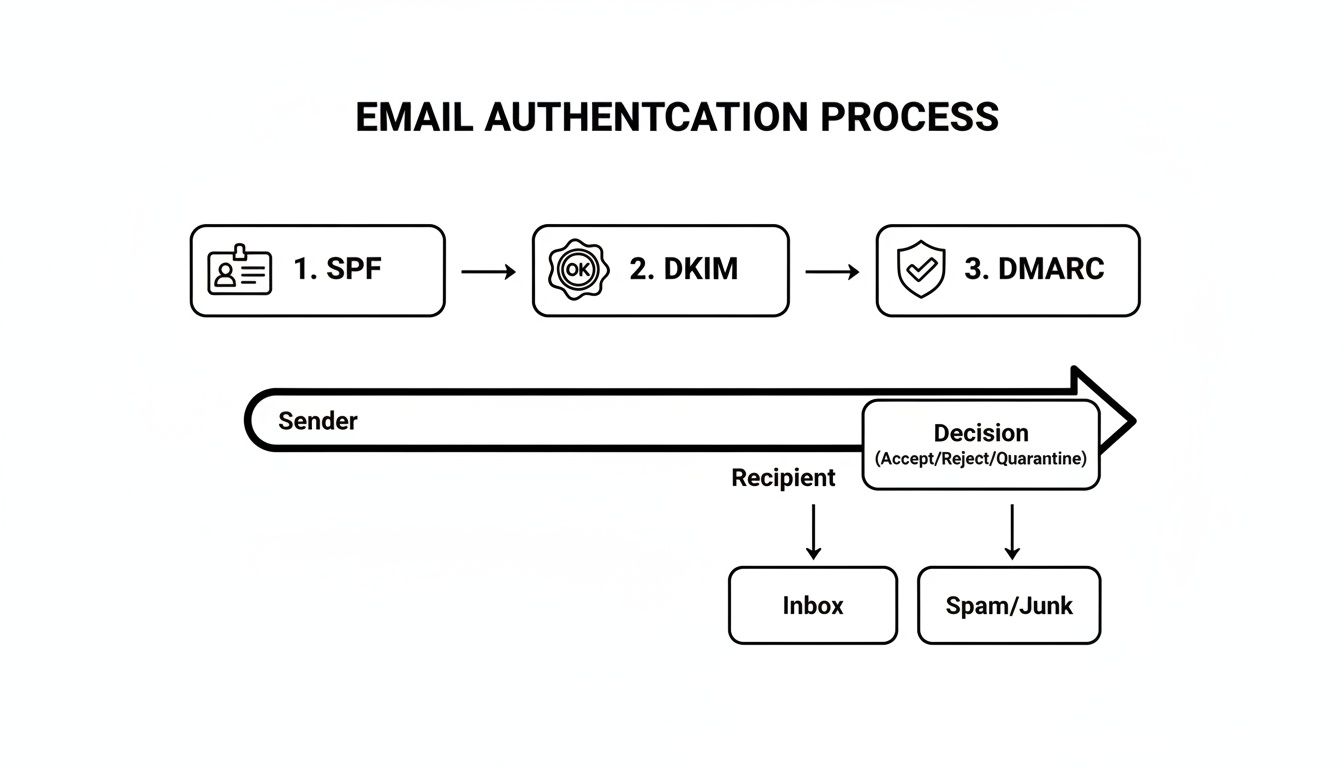
This flowchart shows how SPF, DKIM, and DMARC work together to verify your identity before a mailbox provider even starts to consider your reputation.
A slow and steady IP warm-up is non-negotiable. Rushing the process by sending too many emails too quickly is one of the fastest ways to get your new IP blacklisted, defeating the entire purpose of getting one.
Here’s a practical step-by-step example of a warm-up schedule:
Sample IP Warming Schedule
| Day | Daily Sending Volume |
|---|---|
| 1-2 | 50-100 emails |
| 3-4 | 200-400 emails |
| 5-7 | 800-1,000 emails |
| 8-10 | 2,000-5,000 emails |
| 11-14 | 10,000-20,000 emails |
During this critical period, send only to your most engaged subscribers. This guarantees high open and click rates, which sends incredibly strong positive signals to mailbox providers and speeds up the entire trust-building process.
Protecting Your Domain Reputation
Beyond your IP, your domain reputation is the long-term historical record of your sending practices. It's tied directly to your brand and follows you around, even if you switch ESPs or get a new IP address.
Mailbox providers look at several signals to gauge your domain's health, but two are particularly damaging:
- High Bounce Rates: When your emails consistently fail because of invalid addresses, it screams "poor list management." A bounce rate consistently above 2% is a major red flag.
- High Spam Complaint Rates: This is the most direct negative feedback you can get. When a real person marks your email as spam, it tells their provider your content is unwanted. A complaint rate over 0.1% (that's just 1 complaint per 1,000 emails) can cause serious deliverability problems.
Keeping your domain reputation pristine requires constant vigilance. Regularly clean your list to get rid of invalid addresses, make your unsubscribe link dead simple to find, and always—always—send relevant, valuable content to people who actually want it. This foundation of trust is your most valuable asset in the email world.
Cultivate a Healthy and Engaged Email List
Let’s be honest, all the technical setup in the world doesn't matter if you’re sending emails to people who don't want them. Your email list is the heart and soul of your program, and a bloated, inactive list will tank your sender reputation faster than anything else.
Think of it this way: inbox providers like Gmail and Outlook are watching. They see who opens your emails and who immediately deletes them. A healthy, engaged list sends overwhelmingly positive signals that you’re a legitimate sender. Quality over quantity isn't just a catchy phrase here—it's the golden rule for staying out of the spam folder.
Use Double Opt-In as Your First Line of Defense
If you do just one thing to improve your list quality, make it this: use a double opt-in. It’s a simple process where a new subscriber gets a confirmation email and has to click a link to officially join your list. This single step is your best weapon against typos, fake emails, and spam traps.
Sure, it might feel like an extra hurdle, but the payoff is enormous.
- Proof of Consent: It’s undeniable proof that the subscriber genuinely wants to hear from you.
- Higher Quality Subscribers: Anyone who takes that extra step is, by definition, more engaged from day one.
- Fewer Hard Bounces: You’re validating the email address is real and active right away, which protects your bounce rate.
Think of single opt-in as leaving your front door unlocked. Double opt-in is the deadbolt—it makes sure only invited guests get inside.
Implement a Regular List Cleaning Routine
Even the healthiest lists decay over time. It’s natural. People switch jobs, abandon old email addresses, or just lose interest. Sending to these dead-end accounts generates bounces and tells inbox providers you aren’t paying attention to your list hygiene.
Here's a step-by-step approach to cleaning your list:
- Define "Inactive": Decide on a timeframe, like "no opens or clicks in 90 days."
- Segment Inactive Users: Create a segment in your ESP for everyone who meets that criteria.
- Run a Re-engagement Campaign: Send a short series of emails to this group to try and win them back.
- Remove Non-Responders: If they don't engage with the campaign, remove them from your active sending list.
You should also be ruthless about removing hard bounces immediately after a single failed delivery. For a deeper dive, check out our full guide on how to keep your database pristine: https://emailgum.com/how-to-clean-email-list/
Actionable Takeaway: An uncleaned list is a direct threat to your sender reputation. A small, hyper-engaged list of 1,000 subscribers is infinitely more valuable than a bloated, inactive list of 10,000.
The Power of Smart Segmentation
Let's face it: not all subscribers are created equal. Segmentation is just the practice of grouping your list based on specific criteria so you can send them stuff they actually care about. When content is relevant, engagement shoots up, and your deliverability improves right along with it.
Here are a few real-world examples that work wonders:
- Engagement Level: Split your list into "superfans" (opened in the last 30 days) and less active folks. Always send your new campaigns to the superfans first. Their immediate positive engagement gives the campaign a massive boost with inbox providers.
- Purchase History: An ecommerce store can create a segment of customers who bought running shoes. Their next email shouldn't be a generic store-wide sale; it should be about high-performance socks or marathon training tips.
- Location: A restaurant could segment its list by zip code to send out targeted promos for a local happy hour or a new menu item specific to that branch.
This isn’t just about personalization; it’s about showing inbox providers you know your audience and respect their time.
Introduce a Sunset Policy for Inactive Subscribers
So, what do you do with those subscribers who have gone dark for months? A sunset policy is your game plan for either winning them back or letting them go gracefully. Instead of just hitting delete, you give them one last chance.
This usually looks like a re-engagement campaign—a short series of emails asking if they still want to be on the list, often sweetened with a compelling offer. If you get radio silence after two or three attempts, you can remove them from your active list with confidence. This keeps your list lean, healthy, and packed with people who want to be there. To learn more about keeping your audience hooked, explore these effective customer engagement best practices.
Craft Content That Delights Inboxes, Not Spam Filters
You’ve set up your domain, authenticated everything, and meticulously cleaned your list. The final hurdle? The email itself. Your content is a direct signal to mailbox providers like Gmail and Outlook, who analyze every subject line, link, and image to decide if your message is welcome or just junk.
Think of it this way: the best thing you can do for your deliverability is get your subscribers to engage. When real people consistently open, click, and even reply to your emails, it sends a powerful message that your content is wanted. This is your playbook for creating emails that both your readers and the filters will love.
Avoid Common Content Red Flags
Spam filters have gotten incredibly sophisticated. They’re no longer just looking for a few sketchy words; they’re hunting for patterns of low-quality or deceptive content that spam is known for. Steering clear of these common tripwires is your first line of defense.
Here are a few big ones to watch out for:
- Spammy Keywords: Phrases like "FREE MONEY," "Act Now!," or "$$$" are old-school spam triggers. While one might slip by, a subject line loaded with them is asking for trouble.
- Excessive Punctuation and Caps: TYPING IN ALL CAPS or ending every sentence with multiple exclamation points (!!!) looks unprofessional and, frankly, a bit desperate. It’s a classic spammer tactic that filters are trained to spot immediately.
- URL Shorteners: While great for character limits on social media, link shorteners (like those from bit.ly) are a major red flag in email. Spammers love using them to hide malicious links, so mailbox providers are naturally suspicious. Always use your full, descriptive URLs.
Keep a Healthy Balance of Text and Images
An email that’s just one big image is a huge deliverability no-go. Spammers used to do this to hide shady text from filters, so now, image-only emails are treated with extreme caution.
A solid rule of thumb is to aim for a healthy balance, somewhere around a 60/40 or 80/20 text-to-image ratio. Most importantly, make sure your call-to-action and other critical info are in plain text, not just baked into an image. This also has the added benefit of making your email accessible to people whose email clients block images by default.
If you want to dive deeper into creating emails that look great and land in the inbox, check out our complete guide on email design best practices.
Actionable Takeaway: Your subscribers are your best advocates. High engagement—opens, clicks, and forwards—is the strongest evidence you can provide to mailbox providers that your emails belong in the inbox, not the spam folder.
Stop Hiding Your Unsubscribe Link
I see this all the time: marketers bury the unsubscribe link in the footer, using a tiny, light-gray font, hoping no one will find it. This is a massive mistake.
Hiding the unsubscribe link doesn't stop people from leaving—it just encourages them to hit the "mark as spam" button instead. That spam complaint is infinitely more damaging to your sender reputation than a simple unsubscribe.
Make your unsubscribe link obvious, clear, and easy to click. It’s not a failure; it’s a critical tool for good list hygiene that shows you respect your subscribers.
Here’s a quick rundown of some common content mistakes I see and how to flip them into deliverability wins.
Common Content Mistakes and How to Fix Them
| Common Mistake | Why It Hurts Deliverability | What to Do Instead (Your Action Step) |
|---|---|---|
| Using misleading subject lines | Deceives users, leading to low engagement and spam complaints. | Write clear, honest subject lines that accurately reflect the email's content. |
| Burying the unsubscribe link | Frustrates users, causing them to mark the email as spam instead. | Make the unsubscribe link obvious and easy to access in your footer. |
| Relying too heavily on images | Triggers spam filters and makes the email unreadable if images are blocked. | Maintain a healthy text-to-image ratio and ensure key info is in plain text. |
| Linking to untrustworthy domains | Associates your brand with low-reputation sites, damaging your own sender score. | Only link to reputable, secure websites and use your full domain for tracked links. |
Getting your content right is about showing respect for your subscribers and the mailbox providers. When you do that, your engagement will climb, and your deliverability will follow.
Monitor Your Metrics and Troubleshoot Like a Pro
Getting your emails delivered isn't a one-and-done job. Think of it as an ongoing cycle: send, monitor, adjust, and repeat. The data from your campaigns is telling you a story about your sender health. The real trick is learning how to read that story.
Your key metrics are the vital signs of your entire email program. They're direct feedback from mailbox providers and, more importantly, from your audience. Keeping a close watch on these numbers is how you spot trouble early before a small hiccup turns into a full-blown reputation crisis.
Understanding Your Core Deliverability Metrics
To get good at troubleshooting, you first have to know what you're even looking at. Every email platform throws a dashboard full of data at you, but only a few metrics are truly critical for gauging your sender health.
Here are the big four you should be tracking religiously:
- Bounce Rate: This is the percentage of your emails that just couldn't be delivered. If this number is consistently creeping above 2%, you've likely got a problem with your list hygiene or how you're collecting emails in the first place.
- Open Rate: I know, I know—privacy changes have made this one less precise. Still, a sudden, sharp nosedive in your open rate is a classic sign of a major deliverability problem, often meaning your emails are hitting the spam folder.
- Spam Complaint Rate: This is the metric that can kill your reputation stone-dead. A rate above 0.1% is a massive red flag for mailbox providers. That’s just one complaint for every 1,000 emails sent.
- Click-Through Rate (CTR): This shows you who's actually engaging with what you send. A healthy CTR sends all the right signals to ISPs—it tells them your content is relevant and wanted.
Differentiating Hard Bounces from Soft Bounces
It's easy to lump all bounces together, but they're not created equal. Understanding the difference between a hard and soft bounce is crucial because you need to handle each one completely differently.
A hard bounce means permanent failure. The email address is invalid, fake, or just doesn't exist anymore. There's no coming back from this. Your immediate action step is to remove hard bounces from your list the moment they happen.
A soft bounce, on the other hand, is usually a temporary glitch. Maybe the recipient's inbox is full, or your email file was a little too large. Most email service providers will try to resend these a few times. But if an address soft bounces over and over again, it's time to treat it like a hard bounce and remove it.
Actionable Takeaway: Your goal should be a near-zero hard bounce rate. Treat every single hard bounce as a fire alarm telling you to clean your list now, not later. This is one of the most proactive things you can do to protect your reputation and improve email deliverability.
Your Top Email Deliverability Questions Answered
We've walked through the nitty-gritty of getting your emails to the inbox, from the technical nuts and bolts of authentication to the art of list hygiene. But even after you've dotted your i's and crossed your t's, a few common questions always seem to pop up. Let's tackle them head-on.
How Long Does It Take to Improve My Email Deliverability?
I get this question all the time, and the honest answer is: it depends. Fixing deliverability isn't like flipping a switch; it's more like turning a big ship. If you're starting from a place with serious reputation damage, you're looking at a journey of a few weeks to several months of consistent, good behavior.
Some fixes, like getting your DMARC record published, can have a positive impact pretty quickly. But the real work—rebuilding a trashed sender reputation through a meticulous IP warm-up and focusing on genuine engagement—that takes patience. Consistency is the name of the game.
Is a Dedicated IP Address Always Better?
Nope, not at all. This is a classic "it depends" scenario. A dedicated IP gives you total control over your sending reputation, which is a massive advantage for high-volume senders who have their list hygiene and engagement strategies locked down.
But for smaller senders, or those with spiky, inconsistent volume? A shared IP pool is often the smarter, safer bet. You get to benefit from the established, positive reputation built by thousands of other responsible senders. A poorly managed dedicated IP is a fast track to the spam folder and will always perform worse than a well-managed shared one.
Quick Answer: No. Go for a dedicated IP only if you have high, consistent volume and stellar sending practices. Otherwise, stick with a quality shared IP pool.
Will Buying an Email List Hurt My Deliverability?
In a word: absolutely. Buying an email list is one of the quickest, most effective ways to completely torch your sender reputation. It's just not worth the risk.
These lists are almost always stuffed with old, invalid addresses that will cause your bounce rate to skyrocket. Worse, they're littered with pristine spam traps and, of course, filled with people who never asked to hear from you, which means a flood of spam complaints. Sending to a purchased list is a surefire way to get your domain blocked and your emails sent straight to junk. Always, always build your list organically.
Summary and Your Next Step
To improve your email deliverability, you must build trust with mailbox providers through solid technical authentication (SPF, DKIM, DMARC), maintain a stellar sender reputation, and cultivate a clean, engaged email list. It's an ongoing process of sending valuable content and monitoring your key metrics to stay out of the spam folder.
Recommended Next Step: Check your domain's authentication status right now using a free tool like Dmarcian. It takes less than 30 seconds and is the single most important technical foundation for getting your emails delivered.
Ready to master every aspect of your email strategy? EmailGum provides the in-depth guides and practical advice you need to grow your audience and drive results. Join for free to get started.
