DMARC (Domain-based Message Authentication, Reporting, and Conformance) is like a digital bouncer for your email domain. It stands at the door, working with two other security checks—SPF and DKIM—to make sure every email claiming to be from you is actually legitimate. More importantly, it gives you the power to tell receiving mail servers like Gmail exactly what to do with the fakes.
Why DMARC is Your Key to Email Security and Deliverability
Ever had that sinking feeling, wondering if a scammer could send an email that looks like it came directly from your company? It’s a common and dangerous tactic called email spoofing, and it’s one of the biggest threats to your brand’s hard-won reputation. This is precisely the problem DMARC was built to solve.
Think of DMARC as publishing a clear set of security instructions for the whole world to see. When an email provider receives a message that says it's from you, it looks up your DMARC instructions. These instructions are built on the foundation of two essential email security protocols:
- SPF (Sender Policy Framework): This is your public guest list. It's a DNS record that tells the world which mail servers are authorized to send emails on your behalf.
- DKIM (DomainKeys Identified Mail): This acts like a digital, tamper-proof seal on your emails. It adds a unique signature to each message, proving it hasn't been altered in transit.
DMARC brings these two checks together and adds the crucial missing piece: a clear policy. It answers the question, "So, what should I do if an email fails these checks?" This gives you control to tell inbox providers to monitor suspicious mail, send it to the spam folder (quarantine), or reject it outright. The fakes never even make it to your customers' inboxes.
Before we dive deeper, let's quickly summarize how these three components work together.
Email Authentication at a Glance
This table breaks down the three key components of modern email security and their specific roles.
| Component | What It Is | Its Primary Job |
|---|---|---|
| SPF | A DNS record listing authorized sending servers. | To verify that the email came from an approved IP address. |
| DKIM | A digital signature added to the email header. | To ensure the email's content has not been altered in transit. |
| DMARC | A DNS record that sets a policy based on SPF/DKIM. | To tell receiving servers what to do with unverified emails. |
Together, SPF, DKIM, and DMARC form a powerful trifecta that locks down your domain against abuse.
The Growing Importance of DMARC
Getting DMARC in place is no longer just a "nice-to-have" for the IT department; it's a straight-up business necessity. Recent policy updates from giants like Google and Yahoo now require strong email authentication, especially for anyone sending bulk emails. If you don't have it, your messages are far more likely to get lost in the spam folder or blocked entirely.
Actionable Takeaway: DMARC protects your domain by ensuring only authorized senders can use it. This is crucial for defending against phishing attacks and maintaining your brand's reputation with email providers.
The market is scrambling to keep up. The global DMARC market was valued at USD 89 million in 2023 and is projected to explode, hitting an estimated USD 795 million by 2030. This massive growth is being fueled by the relentless rise in phishing attacks and new compliance rules, cementing DMARC's role as an essential shield in modern email security. You can find more insights on why DMARC enforcement is becoming so critical over at darkreading.com.
How DMARC, SPF, and DKIM Work Together
To really wrap your head around DMARC, you have to stop thinking of it as a solo act. It doesn't work alone. Instead, it’s the manager of a three-part security team, relying on two other protocols—SPF and DKIM—to get the job done.
Imagine the whole process is like a secure package delivery. The contents are valuable, and the recipient has to know the package is legitimate before they accept it.
In this scenario, each protocol has a specific job:
- SPF (Sender Policy Framework): This is the first checkpoint. Think of it like checking the delivery driver's ID and the logo on their truck. Your SPF record is a public list of all the servers you’ve authorized to send mail for your domain. If an email shows up from a server that isn't on the list, it fails the SPF check. Simple as that.
- DKIM (DomainKeys Identified Mail): This is the second checkpoint, acting like a tamper-proof seal on the package itself. A unique, encrypted signature is attached to every email you send out. The receiving server uses a public key (found in your DNS records) to verify that signature. If the signature is valid, it proves the email's contents haven't been messed with in transit. A broken seal means a failed DKIM check.
DMARC is the final, crucial piece. It’s the set of instructions you give the recipient, telling them exactly what to do if the driver doesn't have the right ID (SPF fail) or the package seal is broken (DKIM fail). Without DMARC, the recipient might just shrug and accept the sketchy package anyway.
The Power of Alignment
But the real magic of DMARC comes down to a concept called alignment. It doesn't just check if SPF and DKIM pass; it checks if the domain in the "From" address—the one your customers see—actually matches the domains that SPF and DKIM authenticated.
This is a huge deal. It shuts down a common trick where a scammer passes an SPF check for their own shady domain while slapping your trusted brand name in the visible "From" field. DMARC alignment ensures the company that claims to have sent the package is the same one that actually sent it. This is how the system stops even sophisticated spoofing attacks cold.
This concept map shows how DMARC sits in the middle, taking signals from SPF and DKIM to make a final, informed decision.
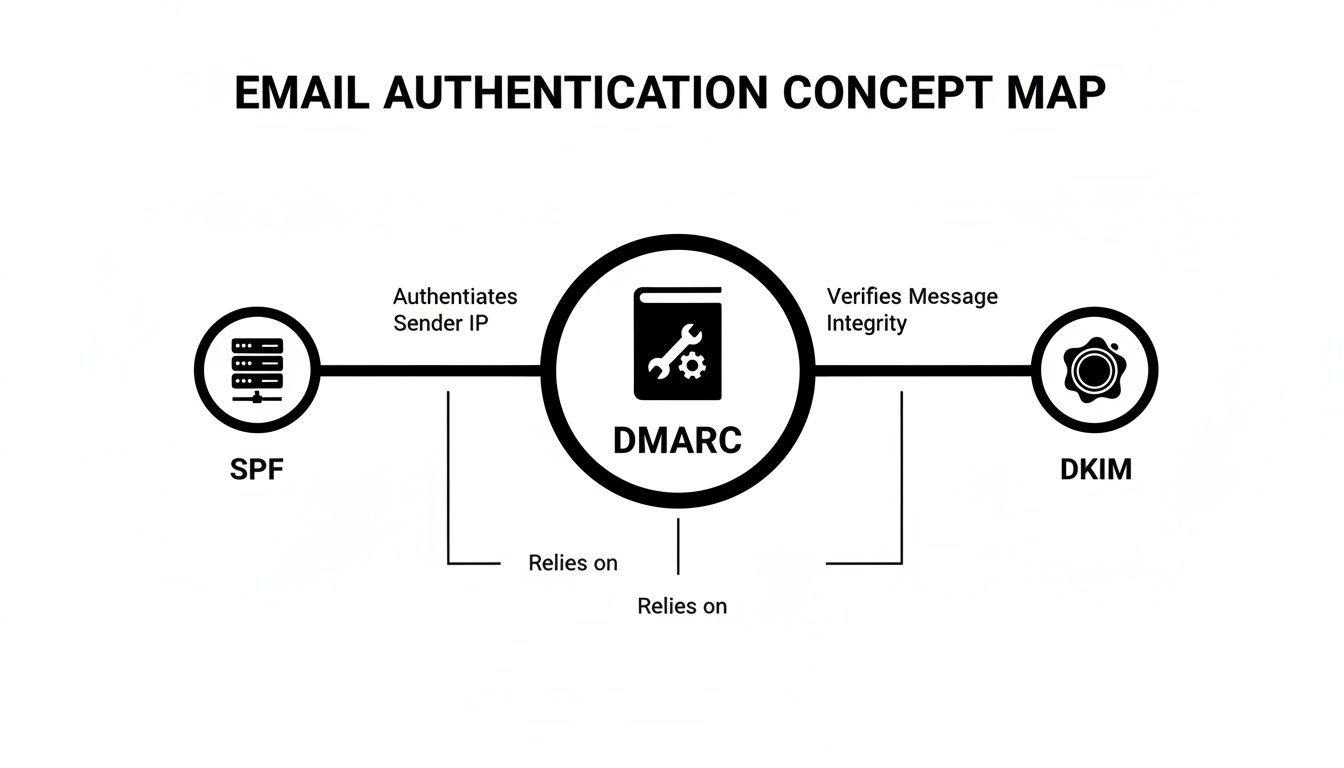
As you can see, DMARC's strength comes from taking the server check (SPF) and the message integrity check (DKIM) and bundling them into a single, enforceable policy.
The Teamwork in Action: A Real-World Example
Let's walk through what this looks like when you send a newsletter.
- You send an email: Your marketing platform (like Mailchimp) sends your weekly update. An invisible DKIM signature is attached, and the sending server's IP address is already listed in your SPF record.
- The email arrives: The message hits a customer's inbox, managed by a provider like Gmail or Outlook.
- Authentication kicks off: The receiving server immediately runs a few checks:
- SPF Check: "Is this server on the approved list for
yourdomain.com?" - DKIM Check: "Does the digital signature on this message match the public key for
yourdomain.com?" - DMARC Check: "Do the domains from the passing SPF and DKIM checks line up with the visible 'From' domain? If not, what does the policy say to do?"
- SPF Check: "Is this server on the approved list for
If everything passes and aligns, your email lands right in the inbox. But if a spammer pretending to be you sends a message that fails these checks, your DMARC policy tells Gmail to either stick it in the spam folder or reject it completely. This collaboration is a game-changer for protecting your brand and your ability to prevent emails from going to spam.
When DMARC, SPF, and DKIM are all properly configured and working together, they form an incredibly robust defense against spoofing and phishing. They are a core component of all essential email deliverability best practices because they build trust with inbox providers. This integrated approach is precisely why modern email security relies on all three protocols working in perfect harmony.
DMARC Isn't Just Tech—It's a Business Advantage
Setting up DMARC isn't just about ticking off another technical box on a to-do list. Think of it as a smart business move that directly shields your revenue, protects your hard-earned reputation, and strengthens the trust you have with your customers.
When you get DMARC in place, you’re unlocking three core benefits that deliver a real, measurable return on your security efforts.
Shut Down Costly Phishing and Spoofing Attacks
First and foremost, DMARC is your single best weapon against direct domain spoofing. This is the nasty trick where a scammer sends an email that looks like it's coming from your exact domain—say, billing@yourcompany.com—to fool your customers or even your own team into giving up passwords or sending money.
Without DMARC, stopping this is a nightmare. But with an enforced DMARC policy (like p=reject), you make it incredibly difficult for these impersonation attacks to even land. You’re essentially telling every receiving mail server to block any unauthenticated email that claims to be from you. The fraud stops before it ever hits an inbox. This is a foundational element of the top email security best practices that every modern business should follow.
Get Your Emails Seen with Better Deliverability
The second huge win is a major boost in your email deliverability. Mailbox providers like Gmail and Outlook are in a never-ending war with spam and phishing, and they absolutely reward senders who can prove they are who they say they are.
When you have DMARC configured correctly, you're sending a powerful signal of trust. It tells inbox providers you’re a legitimate sender who takes security seriously. The result? They're far more likely to route your messages straight to the primary inbox instead of burying them in the spam folder. For anyone in marketing, this translates directly to higher open rates, more engagement, and a better ROI on your campaigns. We dive deeper into this in our guide on how to improve email deliverability.
Actionable Takeaway: By verifying your domain’s legitimacy, DMARC builds a positive sender reputation with major email providers, leading to better inbox placement and increased visibility for your campaigns.
See Everything Sending on Your Behalf
Finally, DMARC gives you something you’ve probably never had before: a complete, crystal-clear view of who is sending email using your domain. DMARC reports provide detailed data that shows you every single service—legitimate or not—that’s out there sending mail as you.
This kind of insight is pure gold. You can quickly identify all your authorized third-party senders, like your CRM, payment processor, or help desk software, and make sure they're all set up correctly. Even more important, you can spot unauthorized or fraudulent activity almost immediately, letting you shut down threats you never even knew were there.
And this isn't just theoretical. A Global Cyber Alliance initiative showed that when over 5,700 organizations adopted DMARC, it created estimated financial benefits of more than $19 million USD in 2018 alone. Those gains came from cutting down on fraud losses, protecting brand reputation, and tightening up email security. You can read more about these findings from the Global Cyber Alliance's DMARC program. It’s solid proof that DMARC is a business decision with very real, tangible benefits.
Your Step-by-Step DMARC Implementation Plan
Alright, let's turn all this theory into action. Getting started with DMARC can feel a little daunting, but the key is to follow a safe, phased rollout. The last thing you want to do is accidentally block your own legitimate emails, so we'll ramp up your domain's protection gradually.
Think of it like rolling out new software. You wouldn’t force everyone to switch overnight; you’d start with a small test group, gather feedback, and fix any kinks. DMARC implementation uses the same three-stage process, moving you from simply listening in to full-blown enforcement.

Stage 1: Start with Monitoring Only (p=none)
Your very first step is to set up a "monitoring only" policy. This is without a doubt the most important phase because it lets you gather a ton of data without affecting your email flow one bit. This policy, p=none, is a passive command. It tells receiving mail servers, "Hey, don't do anything to emails that fail my authentication checks." Instead, it just asks them to send you reports detailing all the email traffic happening on your domain—both the good and the bad.
Your Goal: To build a complete inventory of every single service that sends email on your behalf. We're talking about your email marketing platform, CRM, helpdesk software, payment processor, and any other third-party tool you might have forgotten about.
How to do it:
- Log into your domain's DNS provider (like GoDaddy, Cloudflare, or Namecheap).
- Create a new TXT record.
- Set the Host/Name to
_dmarc. - In the Value/Content field, add your starting policy:
v=DMARC1; p=none; rua=mailto:dmarcreports@yourcompany.com;
v=DMARC1: This tag just identifies the record as DMARC. It's standard.p=none: This puts you in monitoring mode, so no emails will be blocked.rua=mailto:dmarcreports@yourcompany.com: This tells servers where to send the aggregate DMARC reports. Use an email address you can access.
Plan to stay in this monitoring stage for at least a few weeks. You need enough time to collect comprehensive data and make sure you’ve identified every last legitimate sending source.
Stage 2: Move to Quarantine (p=quarantine)
Once you’re confident you've spotted and properly authenticated all your legitimate sending services, you’re ready to dial up the protection. The next logical step is shifting to a p=quarantine policy. This policy tells receiving servers to treat emails that fail DMARC checks with suspicion, usually by routing them to the spam folder. It’s a fantastic middle ground that shields your audience from most fraudulent emails without the harsh finality of blocking them completely.
Actionable Takeaway: The quarantine phase is your safety net. It lets you see the real-world impact of a stricter policy while still giving you a chance to rescue any legitimate emails that might have been accidentally flagged as spam.
How to do it:
- Go back to the
_dmarcTXT record in your DNS settings. - Update the
pvalue fromnonetoquarantine. Your record will now look like:"v=DMARC1; p=quarantine; rua=mailto:dmarcreports@yourcompany.com;"
It's a smart move to ease into it by applying the policy to just a small percentage of your email. By adding the pct tag (for example, pct=10), you’d apply the quarantine rule to only 10% of failing emails, giving you a chance to watch the impact before you go all in.
Stage 3: Enforce Full Rejection (p=reject)
This is the final stage and the ultimate goal: moving to the most secure policy, p=reject. This policy gives a crystal-clear command to receiving servers: if an email claiming to be from your domain fails DMARC authentication, block it entirely. Don't deliver it, period. This gives you the strongest possible defense against spoofing.
A word of caution: You should only move to this stage after you are 100% certain that all your legitimate email streams are correctly configured with SPF and DKIM. Jumping the gun here can cause your own valid emails to get rejected.
How to do it:
- Once again, edit your
_dmarcTXT record. - Change the policy to
reject. Your final DMARC record will be simple and powerful:"v=DMARC1; p=reject; rua=mailto:dmarcreports@yourcompany.com;"
By following this step-by-step plan, you turn what seems like a complex technical task into a totally manageable project. This gradual progression is a cornerstone of modern email deliverability best practices, ensuring you protect your domain without blowing up your business operations in the process.
Making Sense of DMARC Reports
Once your DMARC record is live, receiving mail servers will start sending reports back to the email address you listed. This feedback is what makes DMARC so powerful, but there's a catch: the raw reports are XML files, and trying to read them feels like staring at the Matrix. They’re not meant for human eyes.
This is where the real work begins. Buried in that code is a goldmine of information about who is sending email from your domain. These reports are the key to safely moving from a simple monitoring policy (p=none) to a protective one without accidentally blocking your own emails.
The Two Types of DMARC Reports
DMARC gives you two different kinds of reports, and each one has a specific job.
- Aggregate (RUA) Reports: Think of these as your daily security briefing. They arrive periodically (usually once a day) and give you a high-level summary of all the email traffic claiming to be from your domain. You'll see which IP addresses are sending mail, the volume of messages, and whether they passed SPF and DKIM.
- Forensic (RUF) Reports: These are more like individual incident alerts. They get sent in near real-time right after a specific email fails its DMARC check. They are far more detailed, sometimes including subject lines.
Industry Trend: Most mailbox providers, including Google, have stopped sending Forensic (RUF) reports due to privacy concerns. That makes your Aggregate (RUA) data the true foundation for monitoring your email.
Why DMARC Monitoring Tools Are Essential
Let’s be honest: nobody has the time to manually sort through thousands of XML files. This is why a DMARC monitoring service isn't a "nice-to-have"—it's a must-have. These tools do the heavy lifting, automatically gathering, parsing, and visualizing all that data into insights you can actually use.
Instead of a mess of code, you get a clean dashboard that tells a clear story about your email.

A good tool instantly shows you which sending sources are legitimate and properly authenticated, and which ones are failing. This helps you figure out exactly what to fix next.
Turning Reports Into Actionable Steps
With your data neatly organized, you can start making smart decisions. Your main goal during the monitoring phase is to find every single legitimate service that sends email for your company and get it properly authenticated.
- Identify Legitimate Senders: Sift through your reports and look for the services you know and trust. This could be your email marketing platform like Mailchimp, your CRM, Google Workspace, Zendesk, or even your payment processor. These are your allies.
- Fix Authentication Issues: If you see a service you recognize showing up with SPF or DKIM failures, it’s a red flag. It means your DNS records aren't set up correctly for them. You’ll need to dig into that service's help docs to find the right SPF
includeor DKIM records to add to your domain's DNS. - Investigate Unknown Senders: Now for the mystery guests. If you spot IP addresses or sending sources you don’t recognize, it’s time to play detective. It might be "shadow IT"—a tool a team started using without telling you—or it could be a genuine phishing attack in progress.
By working through your reports this way, you can methodically lock down all of your legitimate email channels. This careful, step-by-step analysis is what allows you to confidently switch to a p=quarantine and, eventually, a p=reject policy, shutting the door on impersonators for good.
Common DMARC Mistakes and How to Avoid Them
Getting DMARC right is one of the most powerful things you can do for your email security. But like any powerful tool, there are a few common traps that can trip you up. Navigating these pitfalls is the difference between a rock-solid security asset and an operational headache that ends up blocking your own important messages.
Let's walk through the three biggest mistakes we see people make, so you can sidestep them completely.
Mistake 1: Rushing to a Reject Policy
The ultimate goal with DMARC is to get to a p=reject policy. It offers the strongest possible protection against spoofing. But jumping straight there without doing your homework is probably the single most dangerous mistake you can make.
Imagine flipping a switch that instantly blocks any email from your domain that isn't perfectly authenticated. If you forgot about the accounting platform that sends your invoices or the HR system that sends payroll notifications, those critical emails will simply vanish into thin air.
How to Avoid It:
Take it slow and follow the phased approach. Start with p=none and plan to stay there for at least a few weeks. Use this time to just watch and listen—your DMARC reports will give you a complete inventory of every service sending email on your behalf. Only after you've identified and properly configured all of them should you even think about moving to p=quarantine, and eventually, to p=reject.
Mistake 2: Forgetting Third-Party Senders
Your email world is a lot bigger than you think. It's not just your main email provider like Google Workspace or Microsoft 365. It’s a whole network of third-party apps sending emails that look like they came from you.
These are the senders people forget all the time:
- Email Marketing Platforms: Think Mailchimp or ConvertKit.
- CRM Systems: Platforms like HubSpot or Salesforce sending automated messages.
- Customer Support Desks: Services such as Zendesk or Help Scout.
- Transactional Email Senders: The tools that handle password resets, shipping updates, and order confirmations.
If these services aren't set up correctly with SPF and DKIM, their legitimate emails will start failing DMARC checks the second you enforce a stricter policy.
The Fix: Treat your DMARC monitoring reports as the absolute source of truth. Comb through the data to identify every single IP address and domain sending for you. For each legitimate service you find, check their help docs for the specific DNS records you need to add to your domain.
Mistake 3: Setting It and Forgetting It
DMARC isn't a crockpot. You can't just set it and forget it. Think of it as an ongoing security process, because your email infrastructure is always changing—new tools get adopted, vendors get switched, and phishers are always dreaming up new angles of attack.
Leaving your DMARC policy on p=none forever is a classic pitfall. Despite how crucial it is, adoption is still surprisingly low—around 84% of domains don't even have a DMARC record. Of those that do, a huge number never move past the monitoring stage. For example, while 93.8% of Fortune 500 companies have a DMARC record, only 62.7% actually enforce a p=reject policy. For smaller businesses, the numbers are even worse: just 15.2% of Inc. 5000 companies use p=reject. This shows just how many organizations get stuck on step one. You can dig into more of this data by checking out the current state of DMARC adoption on validity.com.
How to Avoid It:
Make DMARC monitoring a regular habit. Check your reports weekly or bi-weekly. Look for new sending sources you don't recognize or weird spikes in authentication failures. This vigilance lets you quickly authorize new, legitimate tools while spotting potential threats before they can do any real damage.
Common Questions We Hear About DMARC
When you first start digging into DMARC, it's totally normal for a few practical questions to pop up. Let's tackle some of the most common ones we hear from business owners and marketers just like you, so you can move forward with confidence.
Do I Really Need DMARC for My Small Business?
You absolutely do. In fact, you might need it more than the big guys. Cybercriminals often see small businesses as easier targets, assuming their security isn't as buttoned-up.
DMARC is your first line of defense. It protects your brand from spoofing attacks, gives a serious boost to your email deliverability, and helps build trust with your customers. And with new rules from Google and Yahoo, it's officially non-negotiable for anyone who wants their emails to actually land in the inbox.
How Long Does It Take to Fully Implement DMARC?
Getting the initial record in place—the one that just starts monitoring things (p=none)—can be done in minutes. But the full journey, from that first step to a rock-solid p=reject policy, usually takes anywhere from a few weeks to a couple of months.
Why the wait? That initial monitoring phase is everything. It's how you discover all the different services sending emails on your behalf (think CRMs, invoicing tools, marketing platforms). Rushing this is the single biggest mistake people make, so a little patience here goes a long way.
Can DMARC Hurt My Email Deliverability?
If you set it up wrong, yes, it absolutely can. Jumping straight to a p=reject policy before you've properly authenticated all your legitimate sending platforms is a recipe for disaster—it'll cause your own valid emails to get blocked.
That's precisely why we always start with p=none. It lets you watch and learn without any risk.
But when you do it right, DMARC becomes one of the most powerful tools you have for improving long-term deliverability and building an amazing sender reputation.
Is DMARC Enough to Stop All Phishing?
DMARC is a powerhouse against one specific, very dangerous type of attack: direct domain spoofing. That’s when a scammer sends an email that looks like it came from your exact domain, trying to trick your customers or employees.
It's a foundational piece of the email security puzzle, but it can't do it all. It won't stop attacks from look-alike domains (like yourc0mpany.com instead of yourcompany.com). But what it does, it does perfectly: it secures your single most valuable digital asset—your domain itself.
Summary & Your Next Step
DMARC is an essential email standard that works with SPF and DKIM to block scammers from impersonating your domain. By setting a clear policy (p=none, p=quarantine, or p=reject), you protect your brand, improve your email deliverability, and gain complete visibility into who is sending email on your behalf. Following a phased, step-by-step implementation is the key to getting it right without disrupting your business.
Your Recommended Next Step: Log into your domain's DNS provider today and create your first DMARC record with a p=none policy. This simple, 5-minute action is completely safe and will immediately start gathering the data you need to secure your domain.
At EmailGum, our whole mission is to give you the knowledge you need to master email marketing. Whether it’s securing your domain or writing emails that actually convert, we’ve got the expert guides to help you succeed. Check out our latest articles and strategies at https://emailgum.com.